
Written byJanet BahorunUpdated on Dec 05, 2025

Brief introduction: online YouTube MP4 video downloader is a highly searched topic—and for good reason. Millions of users watch YouTube daily, but streaming alone isn’t always enough. Whether you’re studying for exams, preparing a business presentation, collecting DIY tutorials, or building a workout playlist, there are times when you need permanent access to videos without relying on Wi-Fi or dealing with buffering issues.
In this article
Unfortunately, YouTube does not offer a direct MP4 download option for most videos. Even YouTube Premium downloads remain locked in the app and cannot be transferred or edited.
To overcome this, people turn to online YouTube MP4 video downloader platforms—web-based tools that convert streaming videos into universal MP4 files accessible on any device. This article explores how these tools work, their limitations, safer alternatives like Tatasoft Video Tool, and the smart, secure way to download MP4s.
A online YouTube MP4 video downloader is a browser-based tool that enables users to convert and save YouTube videos as MP4 files directly to their devices. This process is particularly useful because it allows users to bypass the limitations imposed by YouTube regarding video storage and playback.
These tools are favored for several reasons:
However, the effectiveness and safety of these online downloaders can vary significantly, making it crucial to choose reputable options to avoid potential pitfalls.
Downloading YouTube videos as MP4 isn’t just about convenience; it addresses significant issues related to content accessibility, efficiency in workflows, and enhanced learning retention.
Common Reasons People Download YouTube Videos as MP4:
The MP4 format remains the gold standard due to its broad compatibility with various devices, including Windows, Mac, iOS, Android, Smart TVs, and even legacy media players. However, not all downloaders provide the same level of quality or safety, making it vital for users to understand the potential risks before diving into downloads.
Online downloaders are convenient, but they aren’t always safe. Here are the biggest drawbacks:
1. Intrusive Ads & Misleading Buttons
Sites often display multiple fake “Download” buttons that lead to popup ads or unrelated websites.
2. Potential Malware or Tracking Scripts
Some sites inject trackers or force unwanted EXE downloads disguised as MP4 files.
3. Quality Restrictions
Many tools limit output to 360p or 480p, even if the original video is available in 1080p or higher.
4. No Batch Downloads
If you’re trying to download a playlist or multiple videos, online tools force one-by-one saving, which is inefficient.
Due to these issues, online YouTube MP4 downloaders are best suited for quick, one-off saves rather than consistent or professional usage. This is where dedicated software like Tatasoft Video Tool provides a more reliable and effective solution.
The short answer is: Some are safe, many are not.
Most free online platforms rely heavily on advertising, script injections, and aggressive clickbait buttons, which can lead to various security risks, such as:
To stay safe:
If you prefer to avoid these risks altogether, desktop-based tools provide far better stability and control.
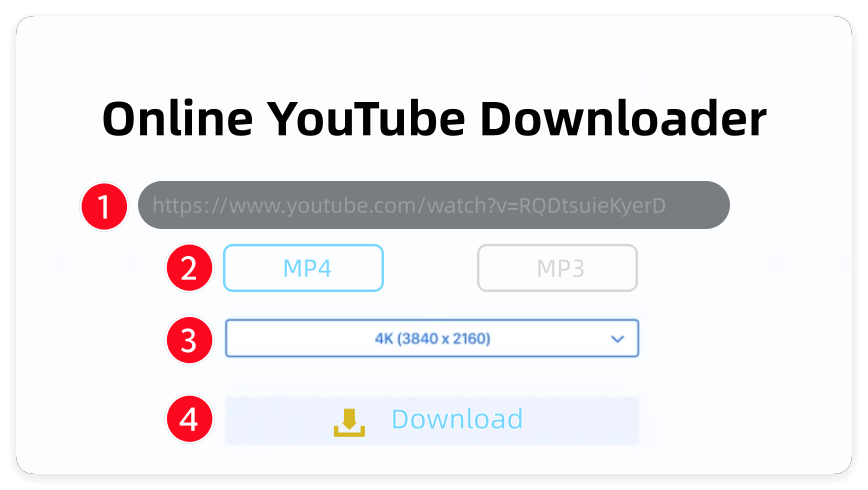
While each site may vary in its interface, the general workflow remains consistent:
1. Open YouTube and find the video you want to download.
2. Click Share → Copy Link (or copy the URL from the address bar).
3. Go to your chosen online YouTube MP4 video downloader site.
4. Paste the link into the input box.
5. Select Video Format → MP4.
6. Choose Resolution (480p, 720p, 1080p, 4K, 8K — depending on availability).
7. Click Download.
8. Wait for processing and save the file to your device.
Pro Tip: If your downloaded MP4 has low volume or blurry output, it indicates that the site compressed the original file. In that case, consider switching to software-based downloaders for better quality.
Many online MP4 downloaders only provide lower-quality single-stream files (like 360p or 480p) due to the technical challenges involved in merging DASH streams (which separate audio and video tracks for higher resolutions). Even if a YouTube video is available in 4K or Full HD, online downloaders might present misleading options such as:
This often leads users to believe they are downloading high-quality content, but they may end up with muted or poorly rendered clips, which can be frustrating.
A better understanding of the limitations of online MP4 downloaders can help users manage their expectations and make informed choices.
If you download frequently, your storage can become cluttered quickly. Follow these organizational strategies:
This ensures your library remains organized and easy to manage.
Choosing between online MP4 downloaders and software downloaders depends largely on your specific needs, frequency of use, and the quality you require. Here’s a breakdown to help you decide which option is best for different scenarios:
| User Type | Best Option | Reason |
|---|---|---|
| Occasional Downloader | Online MP4 Downloader | Works well for one-off downloads. Quick, easy, and requires no installation, making it perfect for casual users. |
| Frequent Downloader | Software | Provides faster downloads, higher quality, and safer file handling. Batch downloads save time for regular users. |
| Content Creators or Students | Software | Ensures full audio-video quality for projects. Keeps files synchronized and reliable for editing or presentations. |
| Long-Term Archiver | Software | Ideal for building a library. Software offers better organization, reliable storage, and long-term access to your downloaded content. |
| Mobile Users | Online MP4 Downloader | Convenient for users who primarily use smartphones or tablets. Allows quick downloads without installing desktop software, though quality and batch options may be limited. |
Understanding the context in which you’ll be downloading videos helps you choose the right tool. If you’re someone who occasionally needs to grab a video for a specific purpose, an online downloader may suffice. In contrast, if you’re engaging in regular content creation or archiving, a robust software solution offers the reliability and quality necessary to meet those demands effectively.
If you don’t want to compromise on quality, stability, or safety, a dedicated tool like Tatasoft Video Tool provides full control without browser limitations.
Why It Works Better Than Online Tools
1. Supports High-Quality Downloads: Unlike many online tools, Tatasoft can handle downloads in 1080P, 2K, 4K, and 8K resolutions, ensuring that users get the best quality available.
2. Automatic Stream Merging: The software automatically merges audio and video streams, eliminating issues of desynchronization and ensuring a seamless playback experience.
3. Batch Downloading Capability: Tatasoft allows users to download multiple videos simultaneously, making it efficient for those who need to save large quantities of content.
4. Ad-Free Experience: Users benefit from a clean interface without intrusive ads or pop-ups, making the downloading process more pleasant.
5. Cross-Platform Compatibility: The software works on both Windows and Mac systems, catering to a wide range of users.
By opting for a dedicated software solution, users can enjoy a more robust and reliable video downloading experience.
Step 1: Download Tatasoft Video Tool
Download Tatasoft Video Tool and install it on your computer.
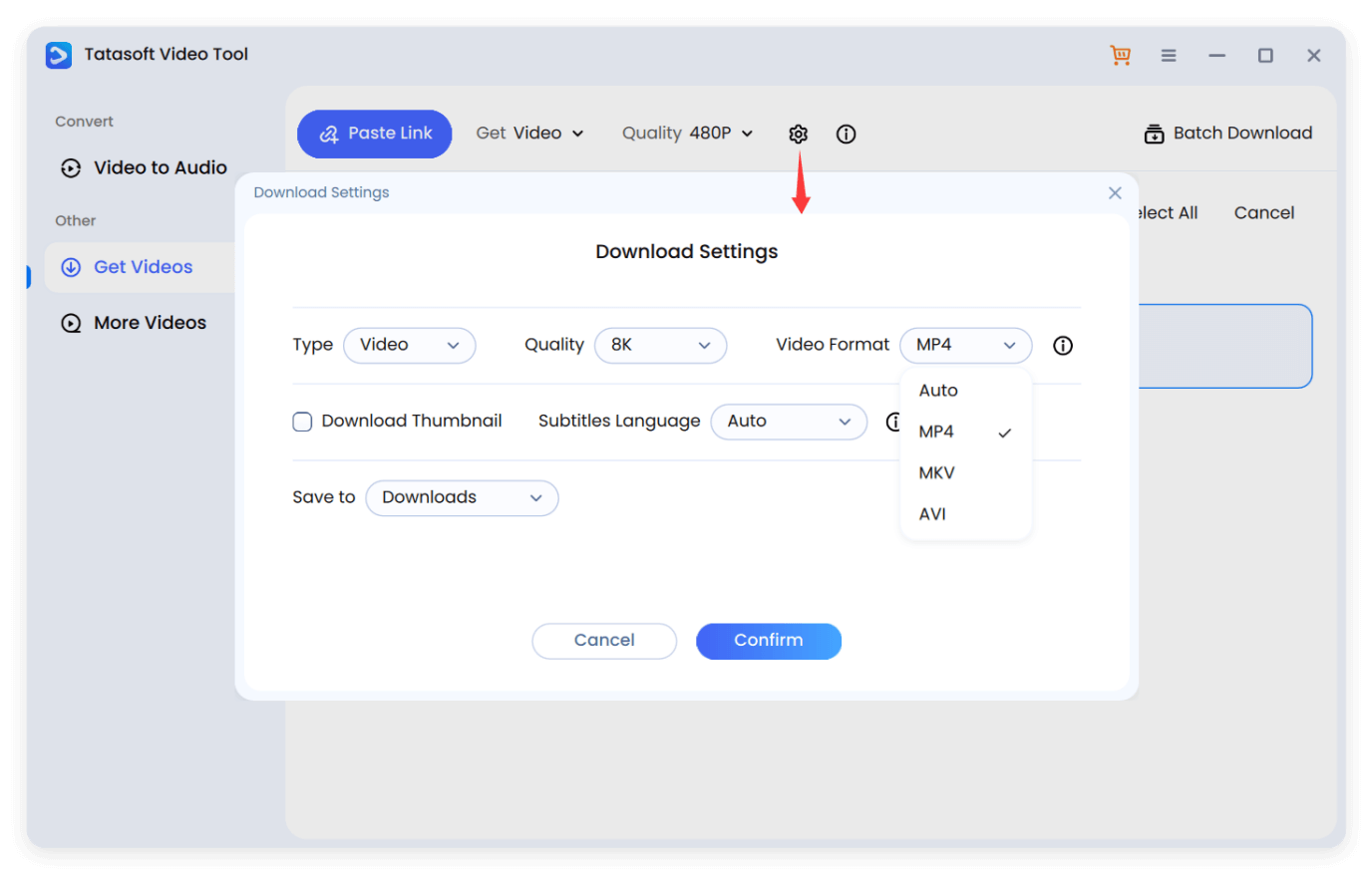
Step 2: Choose format and quality
Run the software and change to Get Videos. Click the settings icon and then choose MP4 format and your preferred quality. Click Confirm to save the changes.
Step 3: Start Download
Copy the YouTube video URL from your browser or app. Launch Tatasoft and click Paste Link. The software will then start to analyze and download. Just wait for processing.
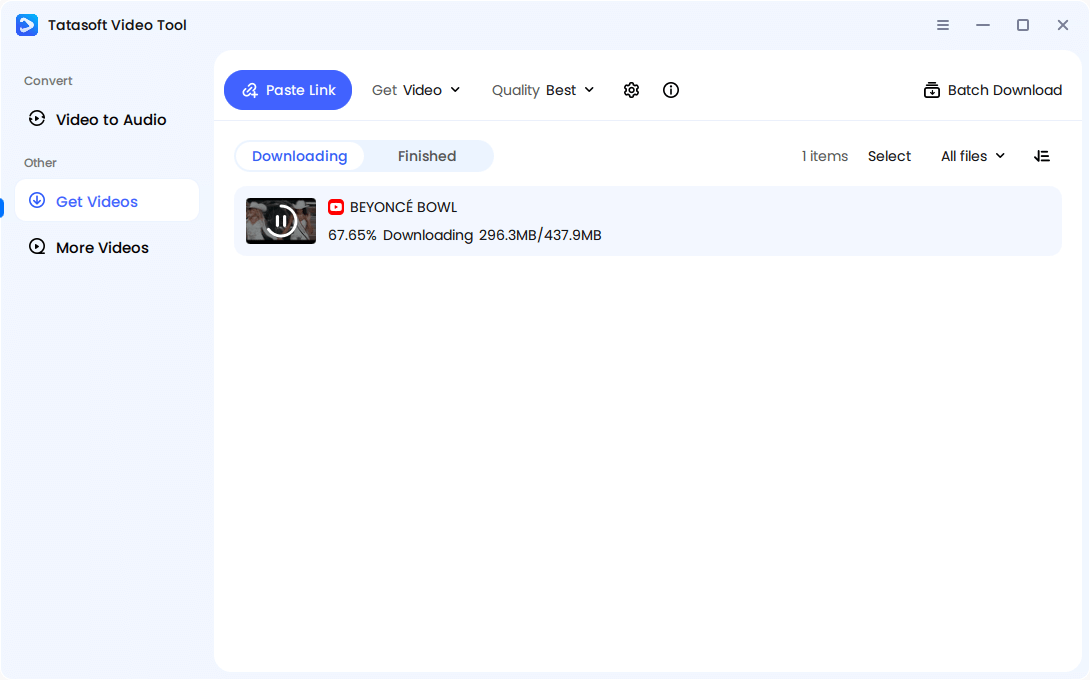
Tip: If you’re downloading a playlist or multiple lecture videos, utilize the Batch Mode to process several links simultaneously, streamlining your downloading tasks.
The addition of the section comparing online downloaders and Tatasoft, as well as best practices, is appropriate. It offers readers a direct understanding of the strengths and weaknesses of each option, helping them make informed decisions based on their specific needs.
| Feature | Online Downloader | Tatasoft |
|---|---|---|
| Installation | Browser-Based | Software |
| Max Quality | 480p–720p | 1080p–8K |
| Batch Download | No | Yes |
| Ad Experience | High | Zero |
| Audio Sync Issues | Possible | Auto-Merged |
| Long-Term Safety | Uncertain | Secure |
When using YouTube video downloaders, understanding copyright laws and fair use is crucial. Downloading your own uploads, copyright-free videos, or public domain content is completely legal. However, users should be aware of the following:
1. Copyrighted Material: Music videos, film clips, and commercial content are often protected by copyright. Downloading this type of content without permission can lead to legal repercussions.
2. Personal Use Acceptance: Generally, downloading for personal use is tolerated, but redistributing content can pose challenges.
3. Reposting Risks: Monetizing or publicly sharing downloaded content without permission from the original creators can lead to serious legal issues.
To Stay Compliant:
1. Utilize online YouTube MP4 video downloader tools strictly for personal viewing.
2. Credit creators if redistributing privately (e.g., in WhatsApp groups or presentations).
3. Never attempt to re-upload someone else’s content as your own, as this infringes on copyright laws.
Using a online YouTube MP4 video downloader can be convenient, but convenience alone shouldn’t compromise quality, safety, or control. While online tools are useful for quick, one-time downloads, they often come with intrusive ads, limited resolution, and unreliable performance.
For anyone who frequently downloads videos, values high-quality audio and video, or needs batch downloading for multiple files, software solutions are far superior. Tatasoft Video Tool ensures professional-grade downloads with complete file integrity, seamless audio-video synchronization, and support for Full HD and 4K resolutions. Its ad-free interface, batch download capability, and cross-platform compatibility make it an essential tool for students, content creators, and long-term archivers alike.
Stop struggling with muted clips, broken buttons, or unreliable online sites. Elevate your downloading experience with Tatasoft Video Tool today and enjoy fast, secure, high-quality MP4 videos every time—whether for learning, work, or entertainment.
a dedicated data recovery writer, has been a pivotal part of the Tatasoft team for over 4 years. Before this, he enriched IBM for 13 years as a Backup and Recovery: TSM Subject Matter Expert. A proud alumn...
Read full bio
This article has been approved by Brett. Bett's dedication to excellence and his comprehensive knowledge of Windows and Mac technologies make her an essential part of any technical writing team. With a career marked by continuous learning and adaptation to new technologies, Bett remains at the forefront of the ever-evolving tech landscape.