
Written byJanet BashorunUpdated on Dec 17, 2025

Brief introduction: Download YouTube videos when you want to enjoy content offline, avoid buffering, or keep your favorite tutorials, music, and entertainment accessible anytime. Streaming is convenient, but it relies on internet speed and availability—something you can’t always control.
In this article
That’s why millions of users now prefer downloading—it removes buffering, prevents data waste, and ensures your favorite videos are always available offline. With the right tools, the process is simple, safe, and suitable for everyone, from students and professionals to casual viewers.
In this article, we’ll show you how to download YouTube videos securely, the benefits of offline access, the risks of unsafe methods, and why Tatasoft Video Tool offers one of the smartest solutions available.
Downloading YouTube videos isn’t just about convenience—it directly solves real problems that users face every day. Here are some of the most common reasons:
1. Offline Access
Being able to watch videos without internet access is the number one reason people download YouTube videos. Whether you’re commuting, flying, or just saving data, offline access ensures smooth playback.
2. Avoiding Advertisements
Advertisements can interrupt concentration, especially during tutorials, interviews, or long documentaries. Downloading removes these distractions, letting you focus fully on the content.
3. Content Preservation
Videos are sometimes deleted, made private, or geo-blocked. By downloading, you guarantee permanent access to content you value, even if it’s no longer available online.
4. Enhanced Learning
Students and educators benefit from saved videos that can be replayed multiple times without buffering. This is particularly useful for complex subjects like coding tutorials, math lessons, or language learning.
5. Entertainment On-the-Go
From music videos to full movie uploads, downloading allows you to build playlists for road trips, workouts, or relaxation without worrying about internet limits.
6. Managing Data Usage
For users with limited internet plans, downloading over Wi-Fi and watching offline saves gigabytes of data that would otherwise be wasted on repeated streaming.
In short, downloading addresses issues of accessibility, convenience, cost, and preservation—making it an increasingly popular choice.
The legality of downloading YouTube videos is often misunderstood. YouTube’s terms of service state that users should not download content unless explicitly allowed by YouTube (like via YouTube Premium’s built-in download button).
However, in practice, many people download YouTube videos for fair-use scenarios, such as:
What you should avoid:
Tatasoft Video Tool is designed for responsible use, ensuring you can build a safe offline library while respecting creators’ rights.
It may be tempting to use free online converters or browser add-ons to download YouTube videos, but these solutions often create more problems than they solve.
Key Risks of Online Converters:
By contrast, Tatasoft Video Tool offers a clean, ad-free environment with guaranteed safe downloads. This eliminates the uncertainty and protects your device from hidden dangers.
Tatasoft Video Tool makes downloading smooth and simple. Here’s the step-by-step process:
Step 1: Install Tatasoft Video Tool
Step 2: Select Format and Quality
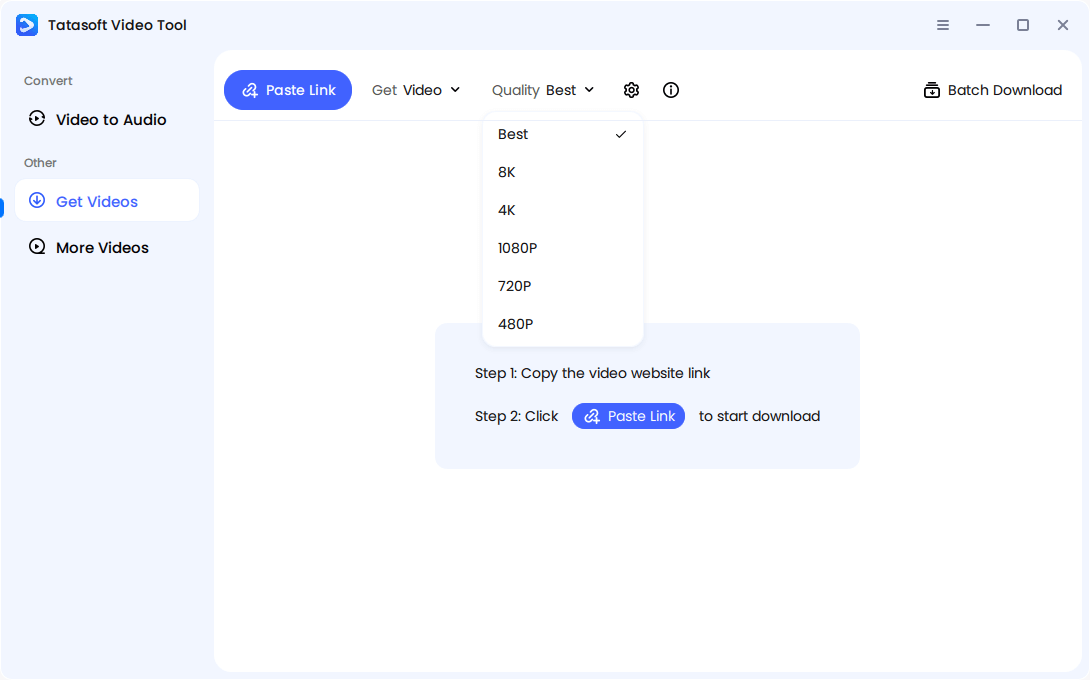
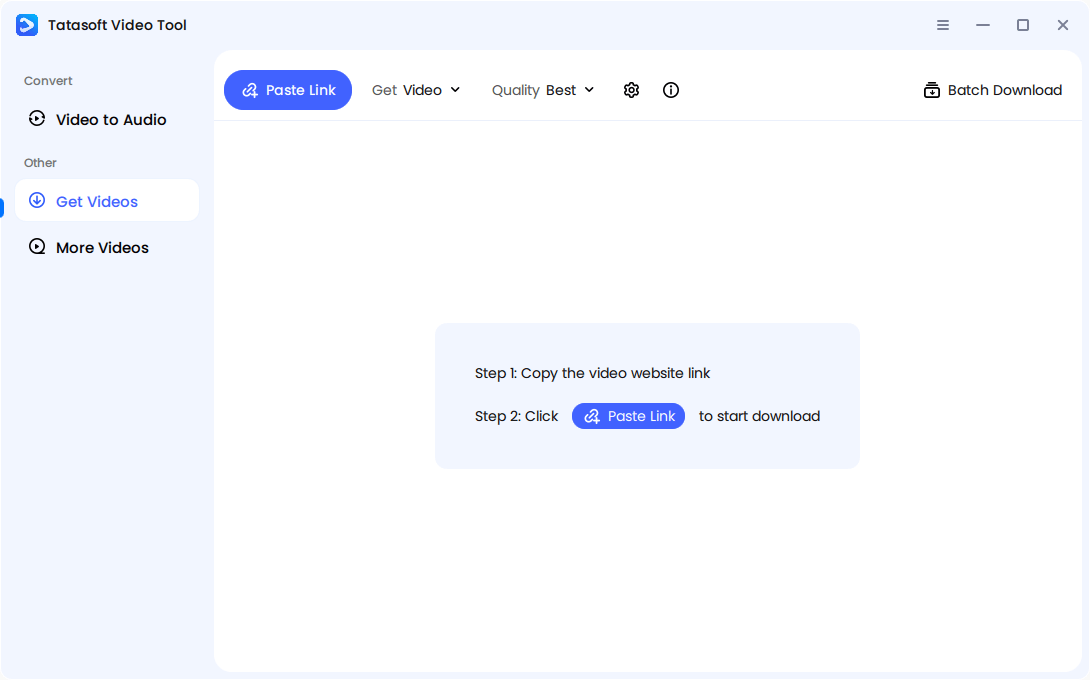
Step 3: Copy and Paste the YouTube Video URL
Step 4: Download and Save
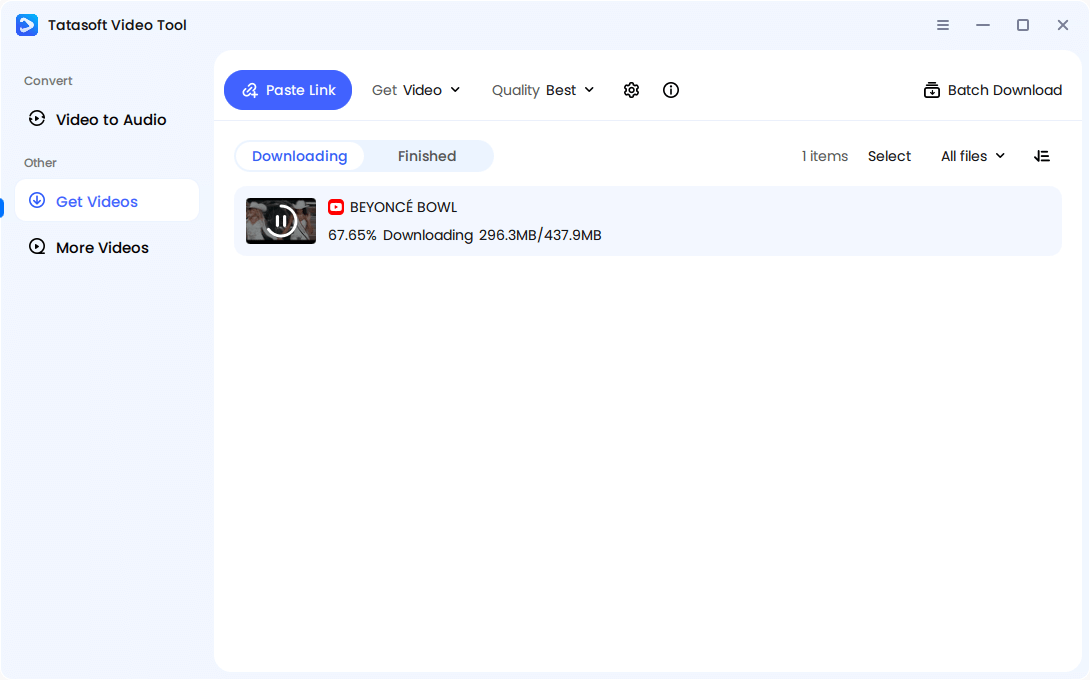
That’s it—you now have your video offline, ready to play anytime.
Tatasoft isn’t just another tool to download YouTube videos—it’s designed with advanced features that make it safer and more reliable than most alternatives:
1. High-Quality Downloads Without Compromise
Tatasoft allows you to save videos in multiple resolutions—from 360p for small devices to full HD and even 4K for those who demand the best clarity. Unlike some tools that reduce quality to save space, Tatasoft preserves the original resolution and crisp sound.
2. Batch and Playlist Downloads
Instead of downloading one video at a time, Tatasoft lets you grab entire playlists or multiple videos simultaneously. This saves time for students downloading full lecture series, or creators building research collections.
3. Audio-Only Mode
Not every user needs video. With audio extraction, Tatasoft lets you convert YouTube videos into MP3 or other formats. This is perfect for music lovers, podcast listeners, or professionals who prefer audio notes.
4. Ad-Free, Clean Interface
Many free downloaders bombard you with ads or add watermarks. Tatasoft guarantees a distraction-free experience and clean files with no hidden branding.
5. Cross-Platform Flexibility
Whether you’re on Windows or Mac, Tatasoft is fully compatible, so you don’t need to worry about switching devices.
6. Fast and Stable Download Speeds
Large files or long videos download smoothly, thanks to optimized servers. This makes it ideal for 4K videos or lengthy webinars that would normally take forever on free tools.
7. Multi-Platform Support
Beyond YouTube, Tatasoft works with Facebook, TikTok, and other popular video platforms. This versatility makes it a one-stop solution for all your downloading needs.
Together, these features ensure that Tatasoft is not just a tool—but a reliable digital companion for casual viewers, learners, and professionals alike.
People often turn to free browser-based downloaders, only to face endless frustration. Tatasoft was designed with these pain points in mind:
Problem 1: Incomplete or Failed Downloads
Many users complain about downloads freezing midway.
Solution: Tatasoft uses robust, high-speed servers that ensure every video is downloaded to completion without interruption.
Problem 2: Poor Quality or Blurry Videos
Some tools downgrade video resolution to save bandwidth.
Solution: Tatasoft preserves original quality, letting you choose from standard definition, HD, and 4K options.
Problem 3: Wrong Formats or Incompatibility
A downloaded file that won’t play is as good as useless.
Solution: Tatasoft offers universal formats like MP4, MKV, and MP3, ensuring compatibility with most devices.
Problem 4: Sync Issues Between Video and Audio
Wit free tools, videos often play out of sync, ruining the experience.
Solution: Tatasoft ensures perfect synchronization between sound and visuals.
Problem 5: Malware and Adware Threats
Many shady downloaders hide malicious software.
Solution: Tatasoft is 100% secure, ad-free, and clean—no hidden risks.
By addressing these issues directly, Tatasoft ensures that downloading is not just fast but also safe and frustration-free.
Downloading responsibly ensures you get the best experience while staying ethical. Here are expert recommendations:
1. Can I download YouTube playlists at once?
Yes, Tatasoft supports batch downloading, making it easy to save entire playlists.
2. Can I download live streams?
Yes, you can download live streams or replays for later offline viewing.
3. What video and audio formats are supported?
Tatasoft allows downloads in MP4, MKV, AVI for video, and MP3 for audio.
4. Will downloaded videos play on my phone?
Yes, since Tatasoft saves in universal formats, you can easily transfer videos to mobile devices.
6. Can I schedule downloads?
While current versions don’t support scheduling, batch downloads let you queue multiple files at once.
When you download YouTube videos, you unlock more than just offline access—you gain control over your entertainment, learning, and productivity. No more buffering interruptions, disappearing content, or wasted data. Instead, you enjoy reliable access to the videos that matter most, anytime and anywhere.
While there are countless tools online, many are unsafe, slow, or unreliable. That’s why choosing a trusted solution makes all the difference. With Tatasoft Video Tool, you get high-quality downloads, faster speeds, and complete peace of mind.
If you’ve ever wished for a smarter, safer, and easier way to save your favorite content, the solution is clear: Download YouTube videos the easy and secure way with Tatasoft Video Tool today—and keep your entertainment in your hands, always.
A dedicated technical writer at Tatasoft with over four years of specialized expertise in computing technology. She crafts actionable, user-centric content for tech niches, specializing in disk cloning, data management, and video solutions for Windows and Mac.
Read full bio
This article has been approved by Ben Lee. Ben's dedication to excellence and his comprehensive knowledge of Windows and Mac technologies make him an essential part of any technical writing team. With a career marked by continuous learning and adaptation to new technologies, Ben remains at the forefront of the ever-evolving tech landscape.