
Written byJanet BashorunUpdated on Jan 04, 2026

Brief introduction: Download video from link to get instant offline access - whether YouTube clips, Instagram Reels, TikTok trends or educational lectures, free from internet speed issues, buffering or the risk of lost content.This guide shows you how link-based video downloading works, and and how to use Tatasoft Video Tool to download videos by simply pasting a link.
In this article
In the past, downloading videos meant searching entire platforms or using complex browser tricks. Today, everything revolves around links. If you have a video link, you have the key to instant access. Here’s why links are now central to video downloading:
This shift makes a download video from link tool indispensable in modern entertainment, education, and business.
If you want a hassle-free way to download video from link, look for these key qualities:
A video downloader that combines these elements makes downloading video from link effortless, safe, and reliable every time.
Tatasoft Video Tool takes the guesswork out of downloading video from link. With its clean interface and advanced technology, it is built specifically to make the process smooth, safe, and reliable.
Standout Features of Tatasoft Video Tool:
✔ High-Quality Downloads – Save videos in 720p, 1080p, or even 4K without quality loss.
✔ Batch and Playlist Support – Download multiple links or full playlists at once.
✔ Audio-Only Mode – Extract soundtracks or lectures in MP3 format.
✔ Cross-Platform Compatibility – Download videos from YouTube, Instagram, TikTok, Facebook, and more.
✔ Fast and Stable Speeds – Optimized servers prevent failed or frozen downloads.
✔ Ad-Free Experience – No pop-ups, spam, or hidden branding.
Together, these features make Tatasoft more than just a downloader—it’s a secure digital assistant for your video needs.
One of the best parts of Tatasoft Video Tool is how easy it makes the process. You don’t need technical skills or complicated software setups. In just a few clicks, you can download video from link and have it saved in the format and quality you prefer.
Step-by-Step: How to Download Video from Link with Tatasoft
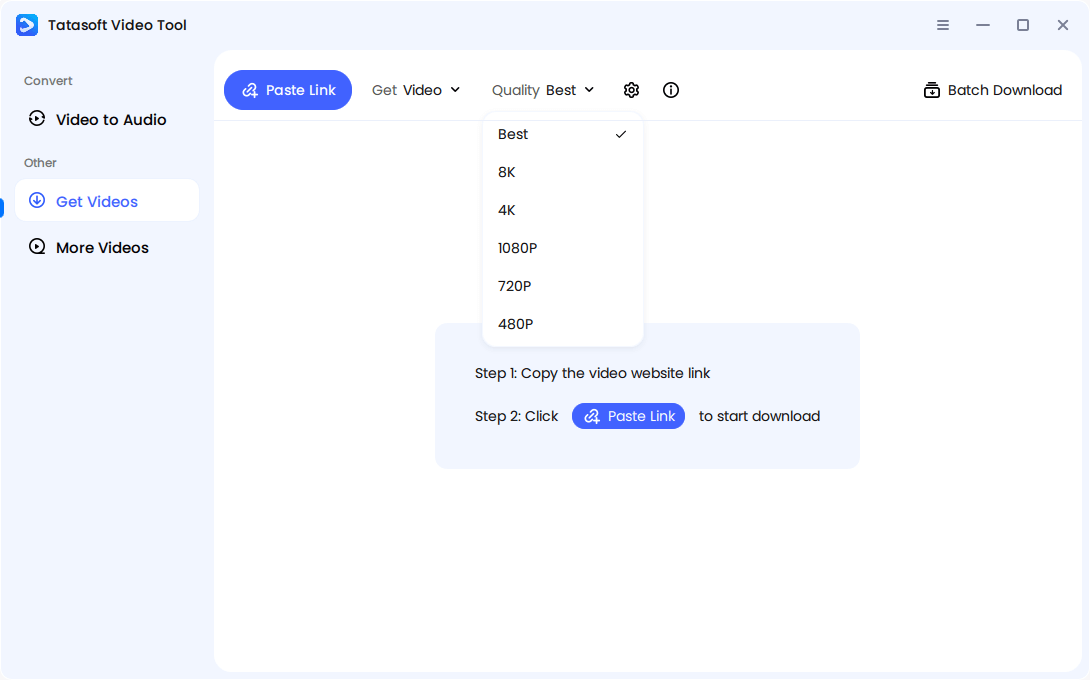
Step 1: Choose Quality and Format
Launch Tatasoft Video Tool on your computer. Tatasoft gives you options to select video resolution (from SD to HD and even 8K when available) as well as file format (MP4, AVI, MKV, MP3, etc.).
Step 2: Copy and Paste the Video Link
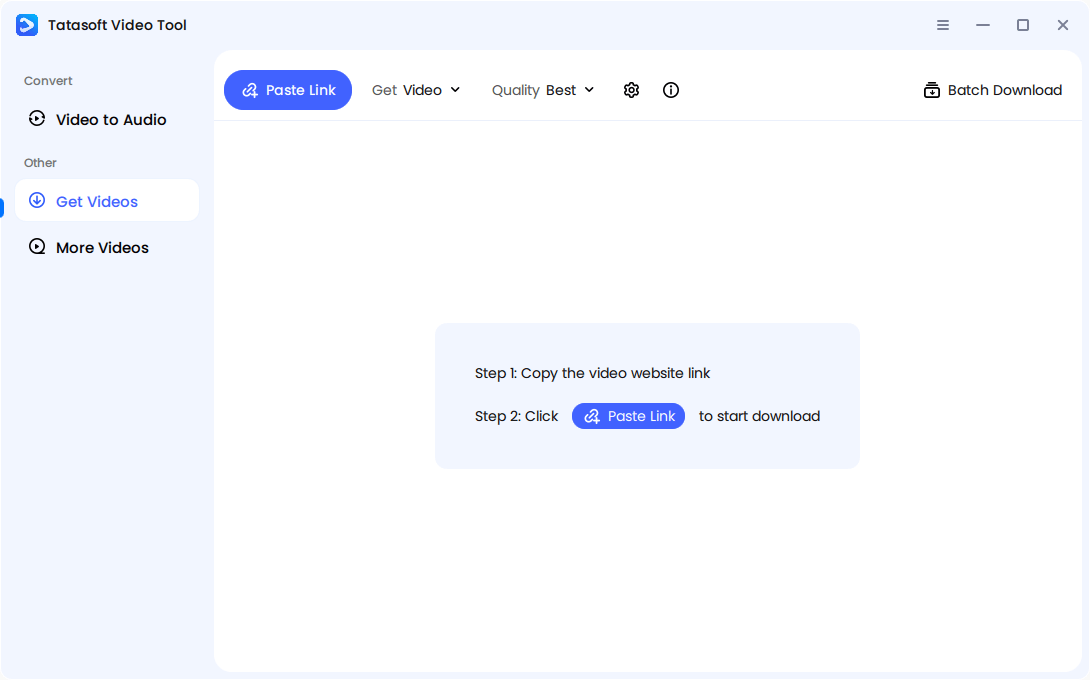
Whether it’s from YouTube, Facebook, Twitter, or another supported site, simply copy the URL of the video you want.
Turn to the Tatasoft Video Tool. The interface is designed to be intuitive, so you’ll immediately know where to paste your link. Just click Paste Link.
Step 3: Download and Save
The software will analyze the URL immediately, and the software will quickly process and save the video to your device.
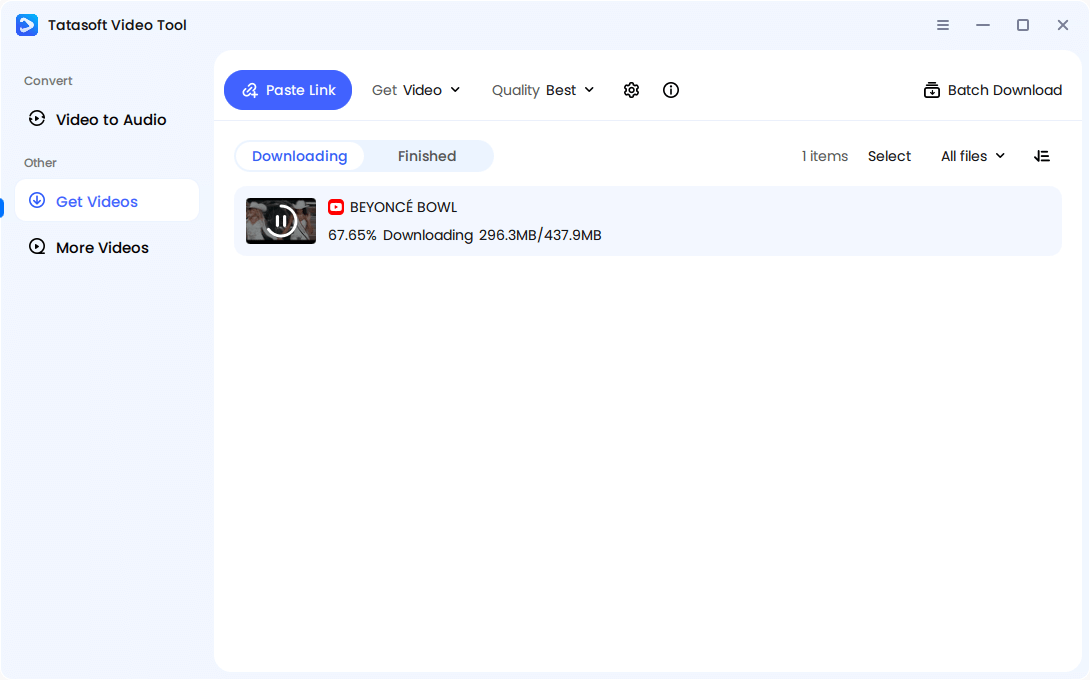
That’s it. No unnecessary waiting, no complicated steps. Within minutes, your chosen video is ready to watch offline, share with friends, or use for your projects.
Despite its convenience, downloading video from link comes with frustrations when using unreliable tools. Users often report:
These challenges highlight why simply copy-pasting into any random downloader isn’t enough. To avoid wasting time or risking your device’s safety, a trustworthy solution like Tatasoft is critical.
Beyond simple offline viewing, downloading video from link opens up creative and practical opportunities:
With so many use cases, downloading video from link becomes more than convenience—it becomes a tool for productivity, creativity, and entertainment.
You may not realize it, but the ability to download video from link fits into more daily scenarios than you think.
1. Learning Made Easier
Students save online lectures or tutorials shared by professors via links. With offline access, studying continues without Wi-Fi interruptions.
2. Entertainment On-the-Go
Friends often share music videos or movie clips as links. Instead of streaming repeatedly, downloading video from link lets you watch anytime—on planes, buses, or road trips.
3. Business and Work Presentations
Professionals use shared webinar or training video links. Downloading ensures smooth playback in meetings without relying on unstable internet.
4. Content Creation and Research
Creators download video from link for reference, analysis, or inspiration, keeping source materials handy for projects.
5. Social Media Highlights
From viral TikToks to Instagram reels, direct links are how people share trending moments. Downloading video from link ensures you never lose content when posts are deleted.
Each of these examples shows that downloading video from link is no longer optional—it’s becoming part of digital efficiency.
Not every tool for downloading video from link is safe or reliable. Many "free" or quick-fix downloaders can put your device and data at major risk:
Safety isn’t just a bonus—it’s the foundation of a smooth downloading experience. By picking the right tool, you’re not just saving videos; you’re protecting yourself and ensuring reliability every single time.
Tatasoft avoids all of these pitfalls by providing a professional-grade tool. With no spam, no hidden trackers, and no risk to your device, you can download video from link confidently every time.
When you download video from link, you take control of how, where, and when you access content. From saving study materials to enjoying entertainment offline, the benefits are endless. But choosing the right downloading tool is crucial. Many free options pose risks, while others sacrifice quality. That’s why Tatasoft Video Tool stands out—it delivers speed, safety, high-quality output, and intuitive performance for downloading online videos to your PC.
If you’re ready to simplify video downloading while keeping your content secure, take the smarter step today. Choose Tatasoft Video Tool to enjoy seamless, secure, and high-quality video downloads from link anytime you need them.
A dedicated technical writer at Tatasoft with over four years of specialized expertise in computing technology. She crafts actionable, user-centric content for tech niches, specializing in disk cloning, data management, and video solutions for Windows and Mac.
Read full bio
This article has been approved by Ben Lee. Ben's dedication to excellence and his comprehensive knowledge of Windows and Mac technologies make him an essential part of any technical writing team. With a career marked by continuous learning and adaptation to new technologies, Ben remains at the forefront of the ever-evolving tech landscape.