
Written byJanet BashorunUpdated on Jan 08, 2026

Brief introduction: YouTube to MP4 is a top search query because millions rely on this universal format for offline study, work, and entertainment. Since YouTube does not support direct MP4 downloads (and Premium downloads are app-locked), this article explores how to safely convert and download YouTube videos to MP4 using secure solutions like the Tatasoft Video Tool.
In this article
When people say YouTube to MP4, they’re referring to the process of converting a YouTube video (which streams online) into an MP4 file that can be saved and played offline. MP4 is short for “MPEG-4,” a highly compatible digital video format that balances high quality and small file size.
By converting to MP4, users can:
This conversion turns temporary entertainment into long-term resources, allowing you to organize your own digital video collection with ease. When converting YouTube videos to MP4, the safest and most efficient method is to use a professional video downloader like Tatasoft Video Tool.
Unlike random online converters that flood users with pop-ups, hidden trackers, or unreliable download limits, Tatasoft provides a secure, ad-free, and privacy-focused environment. It’s built for users who value safety, speed, and clarity and ideal for students, professionals, and creators who need to download and organize YouTube content without technical hassle:
Tatasoft Video Tool maintains YouTube’s original quality while giving you full control over resolution, format, and storage. If you want reliability, speed, and quality assurance, this is the safest route for every YouTube to MP4 conversion.
Follow these simple steps to convert YouTube to MP4 smoothly and efficiently with Tatasoft Video Tool:
Step 1: Choose MP4 Format and Resolution
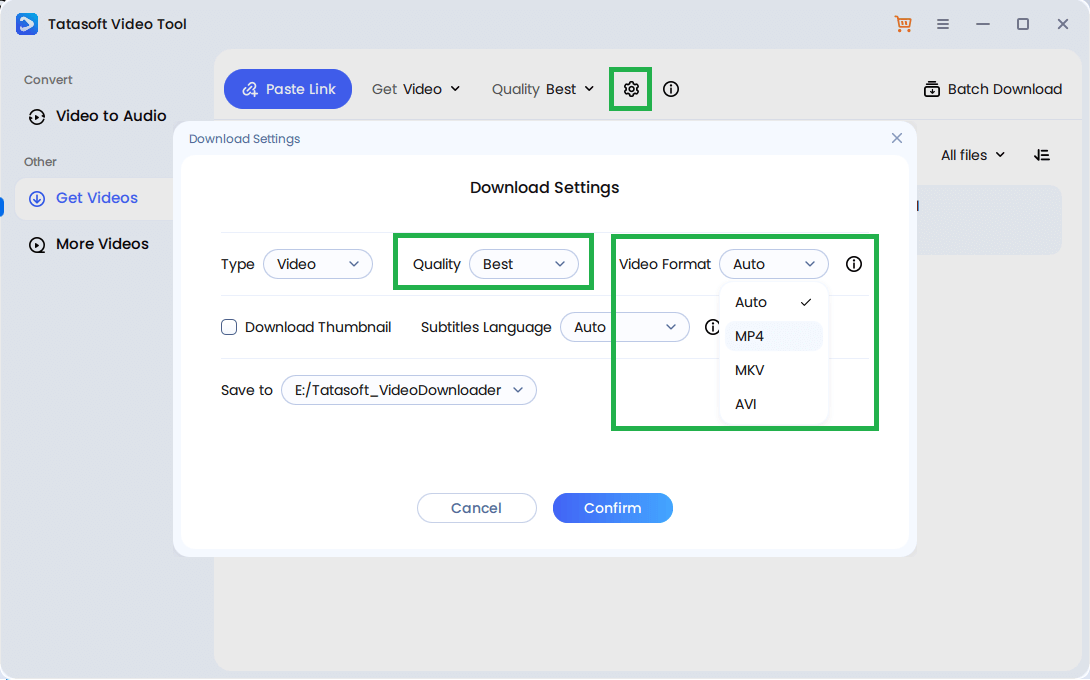
Run Tatasoft Video Tool and select Get Videos option. Click the settings icon and select MP4 as the output format. Tatasoft allows you to choose resolutions ranging from 480p to 8K, depending on the original video’s quality. To always get the best resolution available, you can choose Best and click Confirm button to save the changes.
Step 2: Copy the YouTube Video Link
Open the YouTube video you wish to convert, right-click the address bar, and select Copy Link.
Step 3: Paste the URL in Tatasoft
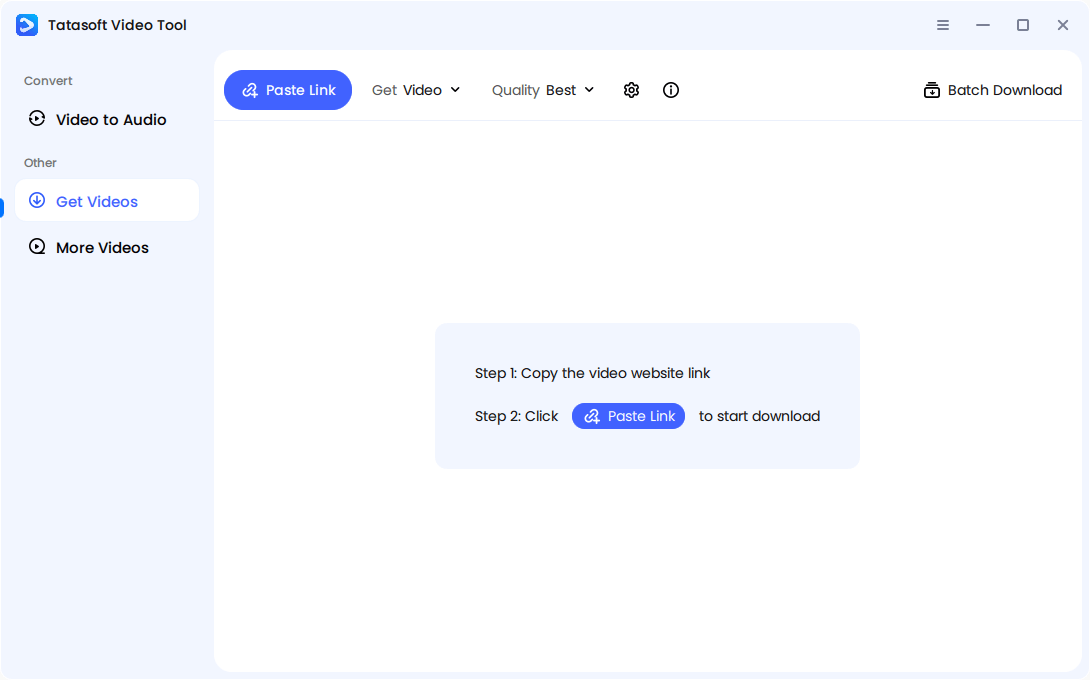
Click the Paste Link button and the copied YouTube video link will be got by the software.
Step 4: Start Downloading
The software will automatically fetch the video data, convert it to MP4, and save it to your selected folder.
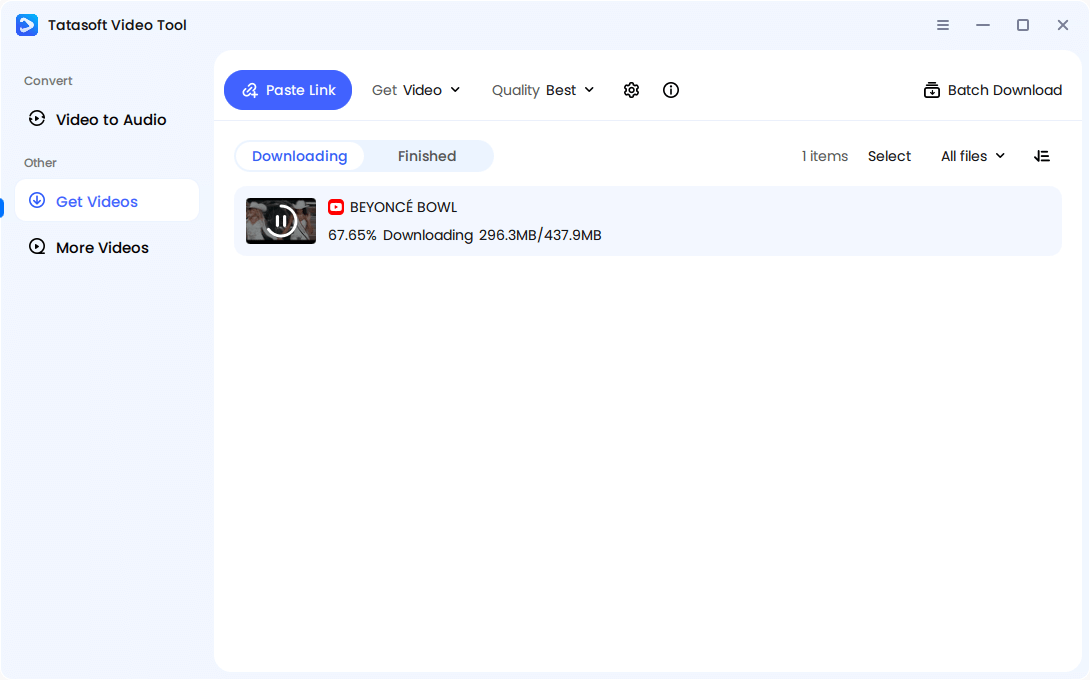
Once completed, open your saved folder and enjoy your MP4 video on any media player or device.
This method guarantees high-speed, lossless conversion when downloading YouTube videos — free from buffering, ads, or intrusive scripts that often plague web-based alternatives.
1. 4K Video Downloader
Offers clean downloads and high resolutions, though its interface feels dated and sometimes struggles with playlist support.
2. YTD Downloader
A known tool for quick video saves, but the free version often limits download speed and pushes premium upgrades aggressively.
3. Online YouTube Converters
Convenient but risky — many host ads, malware, or compress video quality significantly. They also rely on unstable web connections and may not support long videos.
4. Browser Extensions
Work within Chrome or Firefox but come with privacy risks. They can collect browsing data or stop working after YouTube updates its codebase.
Overall, these options may serve casual users, but for long-term, high-quality conversions, Tatasoft remains the safest and most consistent choice to save YouTube videos for offline use.
A quick web search for “YouTube to MP4” brings up hundreds of websites claiming to offer instant downloads. Unfortunately, many of them cause more harm than good.
Typical issues include:
While online converters can seem convenient, they often compromise your device’s safety and the video’s integrity. If you’re downloading frequently or saving high-resolution videos, it’s far safer to use professional software like Tatasoft Video Tool.
When it comes to saving YouTube videos, MP4 isn’t just popular — it’s practical. Compared to other formats like AVI or MKV, MP4 offers several unique advantages:
So when you convert YouTube to MP4, you’re choosing a format designed for both flexibility and performance — ideal for casual viewers, students, and professionals alike.
To understand why conversion tools are needed, it helps to know how YouTube delivers videos. YouTube doesn’t actually store MP4 files for public download — instead, it streams content in segmented data chunks using adaptive bitrate formats (like DASH).
That means the video and audio are often transmitted separately and merged in real time by your browser. So when you download YouTube videos, the converter or downloader must:
1. Fetch the video and audio streams.
2. Merge them into a synchronized MP4 file.
3. Preserve the original quality, frame rate, and sound.
Not all tools perform this process accurately — which is why some downloads lose sync or appear blurry. Reliable software ensures perfect synchronization and consistent quality for every download.
The MP4 format is widely used because it balances compatibility, compression, and clarity, but not all conversions are equal. Poor-quality conversions can cause pixelation, lagging audio, or unstable playback, especially when editing or projecting on larger screens.
Here’s why maintaining quality during conversion matters:
Tatasoft automatically detects the best encoding parameters for each video, ensuring users always get the optimal balance of size and quality without manually adjusting settings.
Even with advanced software, users might face occasional issues during conversion. Here’s how to resolve them efficiently:
1. Video Not Downloading
2. Audio Missing from Output File
3. File Won’t Play
4. Conversion Is Slow
5. Download Fails Midway
These steps help you maintain smooth, error-free downloads while protecting your files from corruption or partial saves.
Before converting YouTube videos, it’s essential to understand what’s allowed. Downloading copyrighted content for redistribution or commercial use violates YouTube’s terms of service. However, downloading public domain, royalty-free, or educational videos for personal use is generally acceptable.
Follow these guidelines:
Following these principles keeps your downloads ethical, secure, and within legal boundaries.
Converting YouTube to MP4 has become an essential part of how users manage digital content today. From educational tutorials to creative references and entertainment archives, MP4 downloads allow flexible, high-quality access anytime — without relying on internet connectivity.
The challenge is finding a method that protects your device, preserves video quality, and delivers consistent results. Many online YouTube MP4 video downloading tools promise convenience but expose users to poor compression, unstable downloads, and privacy risks.
Tatasoft Video Tool provides a better way to download videos from any website. It guarantees clean, secure, and high-quality YouTube to MP4 conversions, while also supporting YouTube to MP3. With high-speed processing, crystal-clear resolution, and ad-free performance, Tatasoft helps you build your offline video library with confidence. Download Tatasoft Video Tool today and enjoy a faster, safer, and smarter YouTube to MP4 experience.
A dedicated technical writer at Tatasoft with over four years of specialized expertise in computing technology. She crafts actionable, user-centric content for tech niches, specializing in disk cloning, data management, and video solutions for Windows and Mac.
Read full bio
This article has been approved by Ben Lee. Ben's dedication to excellence and his comprehensive knowledge of Windows and Mac technologies make him an essential part of any technical writing team. With a career marked by continuous learning and adaptation to new technologies, Ben remains at the forefront of the ever-evolving tech landscape.