
Written byJanet BashorunUpdated on Dec 17, 2025

Brief introduction: YouTube 4K video download is a top demand for global video lovers. With YouTube offering more 4K content than ever - from cinematic short films to tutorials, live concerts, and game streams - viewers want UHD content ad-free, buffer-free, and offline. This article covers safe YouTube 4K downloads and and how to download 4K videos with Tatasoft Video Tool.
In this article
4K isn’t just about sharper visuals; it has become the new expectation for digital media consumption. Here’s why 4K is now dominating online video:
1. Enhanced Texture and Clarity: Beyond resolution, 4K reveals subtle details like skin tones, fabric textures, and background elements that lower resolutions blur out.
2. Immersive Experience – Whether you’re watching films or gaming tutorials, 4K provides depth and realism that make content more engaging.
3. Bigger Screens, Better Results – As TVs, monitors, and projectors grow larger, 4K ensures videos look crisp instead of blurry.
4. Streaming Platforms Adopted It: Netflix, Amazon Prime, Disney+, and YouTube now offer 4K as the norm.
5. Affordable Devices: Smartphones, laptops, and TVs with 4K capability are widely accessible.
6. Consumer Preference: Viewers expect crisp visuals, especially for entertainment and learning.
7. Content Creators Adapted: Many YouTubers now upload in 4K to meet audience expectations and maintain professional credibility.
YouTube video 4k download ensures you stay aligned with today’s digital quality standard. But while streaming in 4K requires stable, high-speed internet, downloading these videos makes them available anytime, even offline. Whether you’re a filmmaker studying techniques, a gamer reviewing streams, or simply someone who enjoys clear, vibrant resolution, 4K downloads guarantee the best experience.
While YouTube makes 4K streaming possible, many people prefer downloading instead. Why? Because streaming in ultra-HD comes with challenges:
1. High Bandwidth Requirements: 4K video needs at least 20–25 Mbps internet speed to stream smoothly. Many users worldwide don’t have access to this level of connectivity.
2. Buffering and Interruptions: Even with fast internet, network fluctuations cause buffering, ruining the immersive 4K experience.
3. Expensive Data Costs: 4K videos consume massive amounts of data. For example, a one-hour 4K video can use up to 7GB of data.
4. Unstable Connections: Travelers or people in rural areas often can’t maintain a stable connection for 4K.
By choosing YouTube video 4k download, viewers avoid these frustrations and enjoy uninterrupted playback anytime.
Not all 4K videos are created equal. Here are technical factors that affect quality:
Understanding these specs helps you select the best quality. Tatasoft gives you control over these settings, letting you balance quality and storage needs.
Tatasoft Video Tool simplifies the 4K downloading process with just a few clicks:
Step 1: Download and install Tatasoft Video Tool on your computer
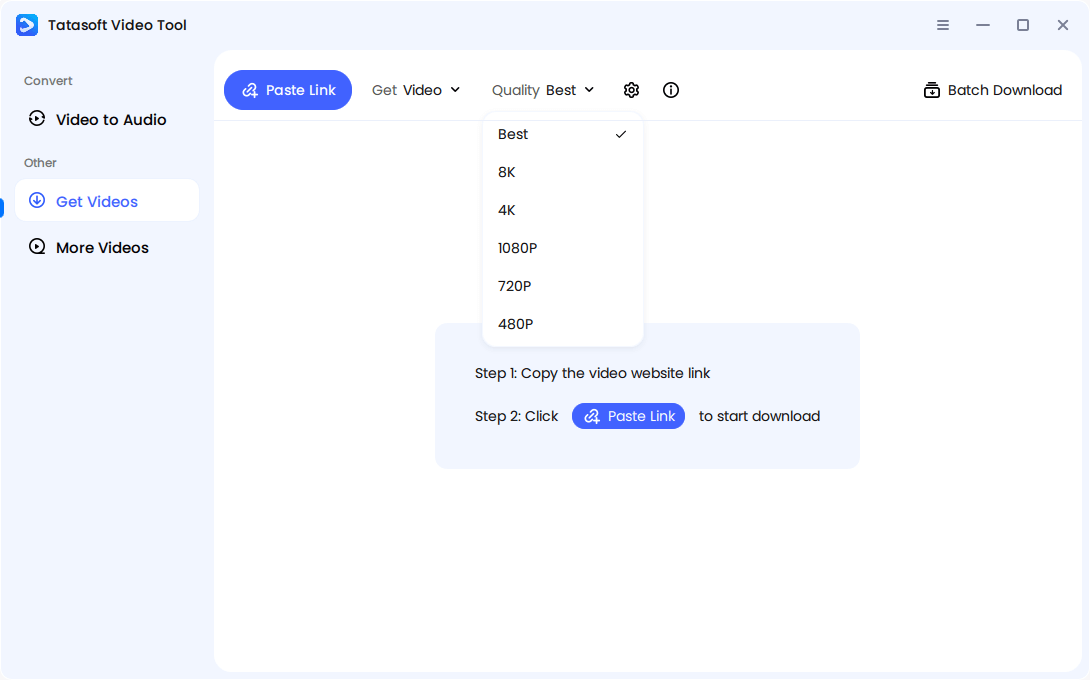
Step 2: Select 4K resolution
Launch the software and change to Get Videos. Choose Quality -> "4K" as your preferred download options.
Step 3: Start 4K Youtube video downloads
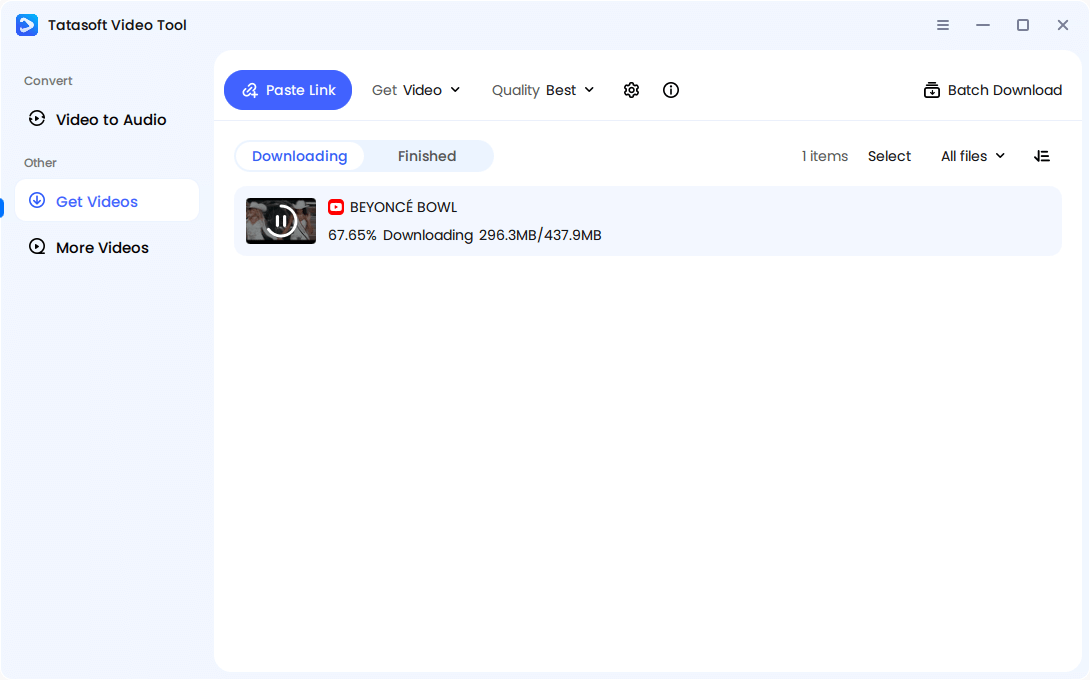
Open YouTube, copy your desired 4K video URL. Switch to the software, click Paste Link, then it will automatically analyze the link and start downloading. Downloads save directly to your device.
Step 4: Access and Organize
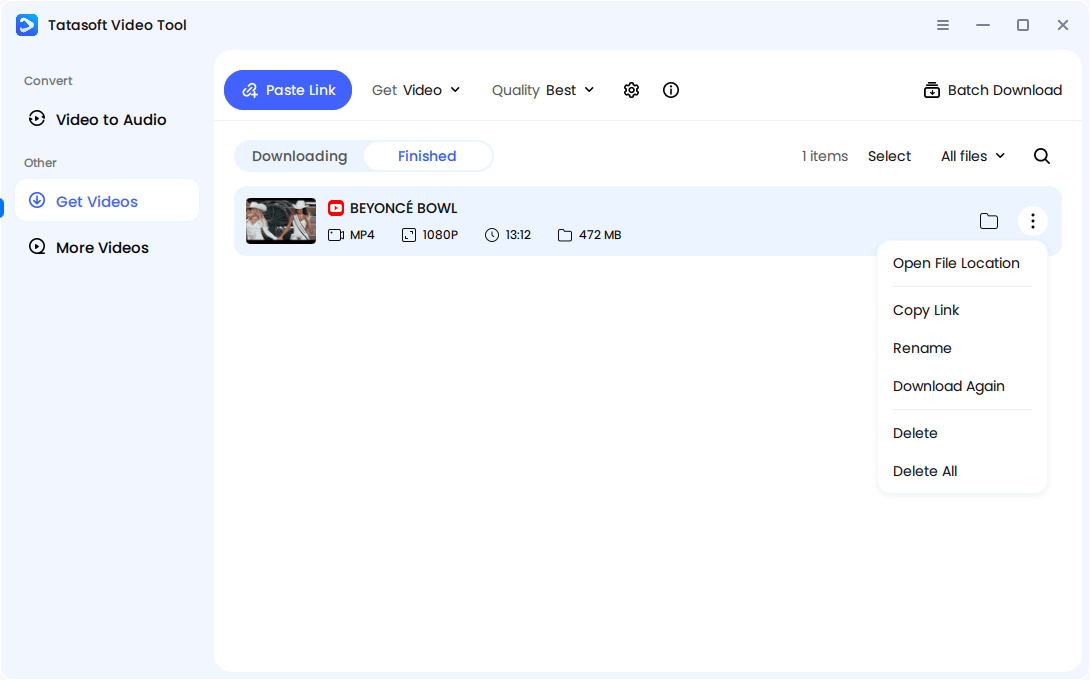
After the downloading process is finished, you can then check the download video file. Store the videos in dedicated folders or external drives for easy access.
This seamless process ensures high-quality, secure downloads every time. Also, the software supports downloading YouTube files in batch. You can also download videos from any other media websites.
There are countless converters online, but Tatasoft Video Tool remains the best because:
This makes Tatasoft not just a downloader, but a professional-grade 4K video tool.
Not all video downloaders are created equal. Here’s how free online converters stack up against premium tools like Tatasoft:
| Feature | Free Online Converters | Premium Tools (e.g., Tatasoft Video Tool) |
|---|---|---|
| Cost | No cost upfront | Paid, but with long-term value |
| Safety | Risk of malware, pop-ups, hidden redirects | 100% safe, no ads or hidden software |
| Video Quality | Often limited to lower resolutions | Guaranteed 4K and multiple format options |
| Download Speed | Slower, dependent on server load | Optimized for high-speed downloads |
| Updates & Compatibility | Rarely updated, may break with YouTube | Regular updates ensure ongoing compatibility |
| Support | No customer support | Reliable support available |
| Extra Features | Limited or none | Batch downloads, audio extraction, more |
While downloading is convenient, not all methods are safe. Many free sites may:
Here are safe downloading practices:
1. Use Trusted Software – Tools like Tatasoft Video Tool offer secure, high-quality YouTube video downloads without risks.
2. Check Resolution Options – Always select the 4K (2160p) setting to guarantee ultra-HD.
3. Respect Copyrights – Download only for personal, educational, or fair use—not for redistribution.
4. Keep Files Organized – Name and categorize your downloads to avoid clutter.
5. Update Tools Regularly – Platforms like YouTube change often, so use software that stays updated.
One major downside of 4K video is file size. A single 30-minute 4K video can take up several gigabytes. Here’s how to manage storage wisely:
With proper storage strategies, you can enjoy unlimited 4K downloads without overwhelming your devices.
For anyone serious about safe and consistent YouTube video 4k download, premium tools are the only sustainable choice.
It’s important to understand the legal boundaries when downloading YouTube content:
1. Copyrighted Content: Movies, shows, or music videos are often copyright-protected. Downloading them without permission may infringe rights.
2. Fair Use: Personal use, research, or education often qualifies as fair use, but redistribution does not.
3. Respect Creators: Supporting YouTubers by liking, sharing, or subscribing still matters, even if you download their content for offline use.
4. Avoid Piracy: Selling or re-uploading downloaded content is illegal and unethical.
By respecting these guidelines, users ensure their YouTube video 4k download habits remain safe and responsible.
YouTube video 4k download is more than just saving a YouTube video - it’s about preserving the highest-quality viewing experience available. From movies and tutorials to business webinars and gaming streams, downloading in 4K ensures crisp, clear playback anytime, anywhere.
But safety and quality matter. Instead of using unreliable online tools, trust Tatasoft Video Tool for secure, fast, and professional 4K downloads. Experience videos the way they were meant to be seen—download your favorite YouTube videos in 4K today with Tatasoft Video Tool.
A dedicated technical writer at Tatasoft with over four years of specialized expertise in computing technology. She crafts actionable, user-centric content for tech niches, specializing in disk cloning, data management, and video solutions for Windows and Mac.
Read full bio
This article has been approved by Ben Lee. Ben's dedication to excellence and his comprehensive knowledge of Windows and Mac technologies make him an essential part of any technical writing team. With a career marked by continuous learning and adaptation to new technologies, Ben remains at the forefront of the ever-evolving tech landscape.