
Written byJanet BashorunUpdated on Mar 11, 2026

Brief introduction: Stop struggling with Facebook's download restrictions and encryption that block standard "right-click" saving. This guide shows you how to save Facebook video to computer for offline access to tutorials, presentations, or entertainment. By using reliable FB video downloader like Tatasoft Video Tool, you can safely store high-quality content locally for full control over your media library.
In this article

Saving Facebook videos to your computer isn’t just about convenience, it’s about control. Facebook is a "walled garden." If the platform goes down or your data plan hits its limit, your saved videos are gone. In my experience, building a local library is the only way to ensure 100% control.
While browser tricks occasionally work, Facebook frequently updates its code to break them. I prefer using the reliable FB video downloader - Tatasoft Video Tool because it bypasses session-based encryption and provides consistent HD results.
Note for Mac Users: Although the interface is similar, ensure you are using the version optimized for your OS to download videos from Facebook on Windows or macOS.
Step 1: Copy the FB Video Link
Open Facebook in your browser. Right-click the video and select "Copy video URL at current time" or copy it from the address bar.
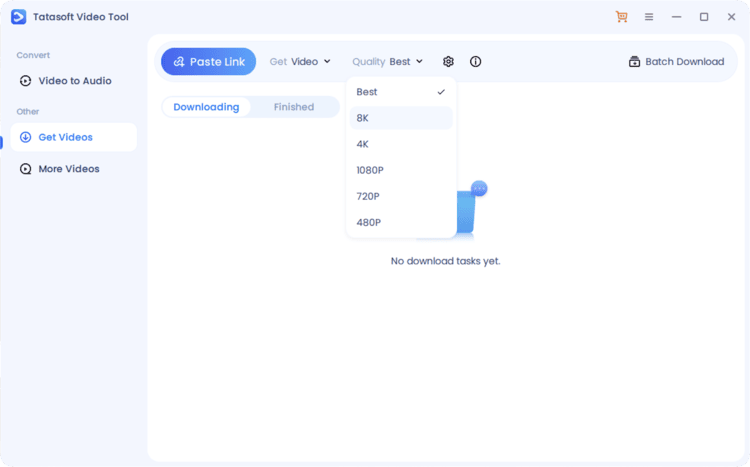
Step 2: Choose Quality and Format
Launch the Tatasoft Video Tool. Change to Get Videos option and choose to Get Video. You can download Facebook videos in 1080p or even 4K if the source allows.
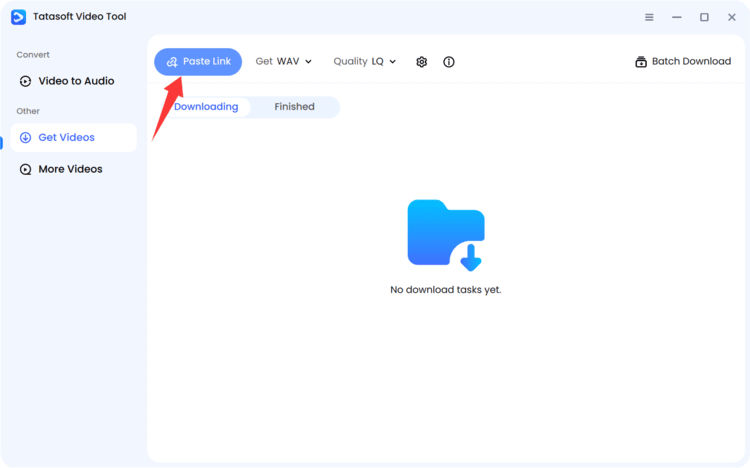
Step 3: Paste the Facebook Video URL
click Paste Link to paste the link. The software does the heavy lifting of "decoding" the Facebook encrypted stream.
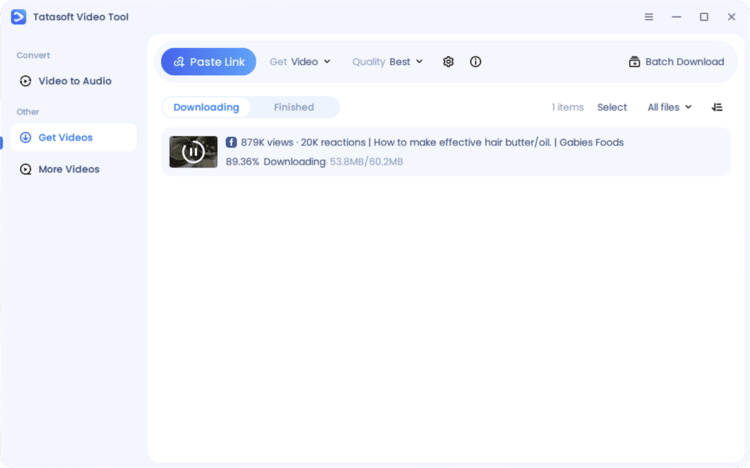
Step 4: Start Downloading FB Video
Once the analyzing process is done, the software will start Facebook video download automatically. Your video is saved directly to your hard drive, ready for offline use.
After the downloading process is completed. You can go to Finish tab to access the downloaded FB videos.
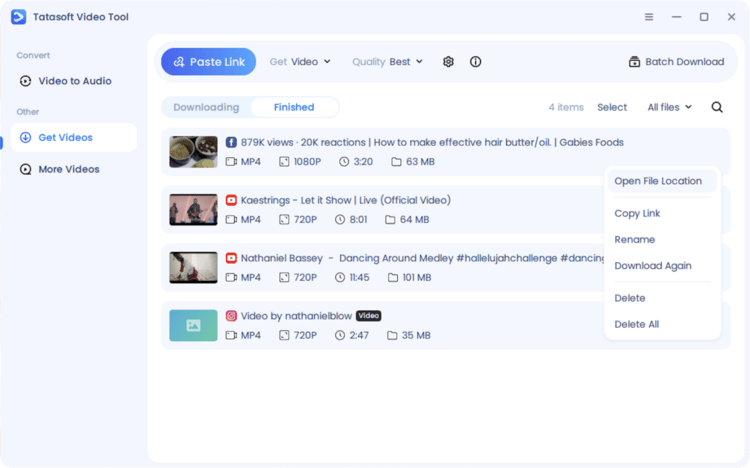
This intuitive process bypasses browser restrictions and ensures every Facebook video you save to your computer is high-quality, organized, and ready for offline use. If you want FB Reels, please refer to this guide on how to download FB Reels.
The way you download and store Facebook videos directly affects their visual quality and playback performance. To get the best output:
When combined, these practices produce videos that remain crisp and professional, even when viewed offline on large screens.
Have you ever wondered why there isn't a "Save As" button on Facebook videos? It’s not just an oversight. Facebook uses DASH (Dynamic Adaptive Streaming over HTTP), which splits audio and video into tiny, separate fragments.
Standard Facebook video download online tools often struggle with this, resulting in videos with no sound or low resolution. Desktop software like Tatasoft acts as a bridge, re-assembling these fragments into a single, high-quality MP4 file.
These safeguards explain why you can’t simply right-click and save. To save Facebook video to your computer properly, you need specialized software that handles Facebook’s encryption system while keeping the process legal and efficient.
Beyond encryption and segmented delivery, Facebook enforces additional measures to discourage copying. These include hidden file paths within its code, preventing browsers from detecting exact file sources.
Private and group-only videos also have authentication barriers — meaning that even if you copy the link, it won’t play outside your logged-in session. Additionally, Facebook updates its algorithm frequently, altering video source URLs to render outdated downloaders ineffective.
This layered protection is why not all download methods work consistently. Reliable desktop tools are updated regularly to decode these structures safely without breaching privacy or violating terms of use.
Understanding this helps you use the right approach from the start, saving time and frustration.
Facebook uses multiple video formats depending on device compatibility, creator preferences, and regional internet speeds. Recognizing these helps you decide which version is best to save.
Understanding these distinctions ensures you pick the right download settings. If you’re creating an offline video collection for research or business, MP4 is the safest and most versatile option.
Some users attempt to use built-in tools like Screen Recorder on their computers, but these often come with limitations.
Here’s a quick comparison:
| Feature | Native Tools (e.g., Screen Recorder) | Third-Party Downloaders |
|---|---|---|
| Video Quality | Usually reduced | Maintains HD or 4K |
| Ease of Use | Manual setup | One-click download |
| Audio Sync | Often delayed | Perfectly synchronized |
| Batch Downloads | Not available | Fully supported |
| Speed | Slow | Optimized for large files |
While native screen recorders or browser cache tricks can capture playback, they often reduce video quality and waste time. Tools like Tatasoft Video Tool offer smoother, cleaner, and more efficient results for both personal and professional needs.
Many people attempt to use web-based downloaders, only to encounter pop-ups, ads, or limited quality. Desktop software provides a cleaner, more powerful alternative.
For anyone regularly saving videos, desktop video downloaders are not just better, they’re essential for productivity and data integrity.
Private or group videos require extra care when saving due to privacy settings. To handle them safely and efficiently:
With these strategies, saving multiple Facebook videos becomes streamlined, ethical, and effective.
Learning how to save Facebook video to computer changed how I consume media. I no longer rely on a stable internet connection to learn new skills or revisit favorite memories. By using a dedicated tool like Tatasoft Video Tool, you avoid the security risks of "free" websites and get professional-grade results every tim.
Remember to respect privacy and copyright rules, organize your files effectively, and back up important content. With the right tools and practices, saving Facebook videos becomes safe, convenient, and productive. Try downloading your first FB video today and see how much better the experience is when you're in control of the play button!.
A dedicated technical writer at Tatasoft with over four years of specialized expertise in computing technology. She crafts actionable, user-centric content for tech niches, specializing in disk cloning, data management, and video solutions for Windows and Mac.
Read full bio
This article has been approved by Ben Lee. Ben's dedication to excellence and his comprehensive knowledge of Windows and Mac technologies make him an essential part of any technical writing team. With a career marked by continuous learning and adaptation to new technologies, Ben remains at the forefront of the ever-evolving tech landscape.