
Written byJanet BashorunUpdated on Mar 04, 2026

Brief introduction: Stop letting your favorite Facebook Live sessions, rare indie performances, or insightful keynote speeches get lost in an endless scrolling feed. I’ve spent years archiving digital media, and I’ve found that the most reliable way to preserve these gems is to convert Facebook video to MP3. Whether you’re building an offline podcast library or saving a catchy background track, Tatasoft Video Tool transforms bulky video files into crisp, high-bitrate audio in seconds.
In this article
In my experience testing dozens of web-based "rippers," most are riddled with intrusive ads or capped at 128kbps. Tatasoft Video Tool stands out because it operates locally on your machine, ensuring privacy and much faster processing speeds.
Here's how to Convert Facebook Video to MP3:
Step 1: Download and Install.
Free download Tatasoft Video Tool and install it using the setup guide. Unlike browser extensions, this standalone tool handles Facebook’s encrypted fragments much more reliably.
Step 2: Grab the Source Facebook video URL.
Find the Facebook video or Reel. Click "Share" and then "Copy Link". If you are specifically looking for Reels, you might want to download Facebook Reels directly before converting.
Step 3: Set Your Output to MP3.
Open Tatasoft Video Tool and navigate to the Get Videos tab > Select Audio.MP3. If you’re an audiophile, I highly recommend selecting 320 kbps to retain the depth of the original broadcast.
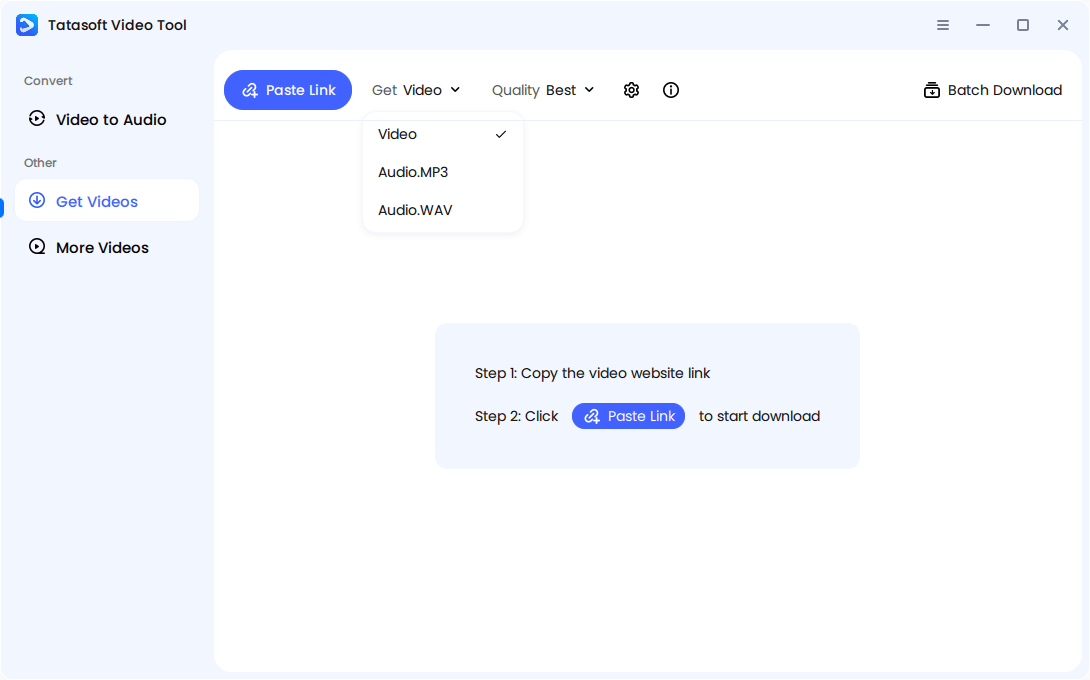
Step 4: Paste the Facebook video URL and Analyze.
Click the Paste Link button. The software intelligently parses the link—a feature that also works if you need to download online videos from other platforms.
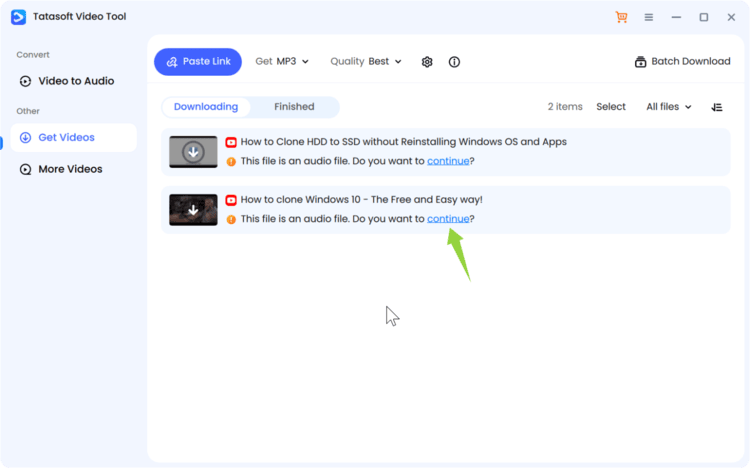
Step 5: Start Facebook video to MP3 conversion.
Hit continue and the tool strips the video container and saves the pure audio stream to your selected folder.
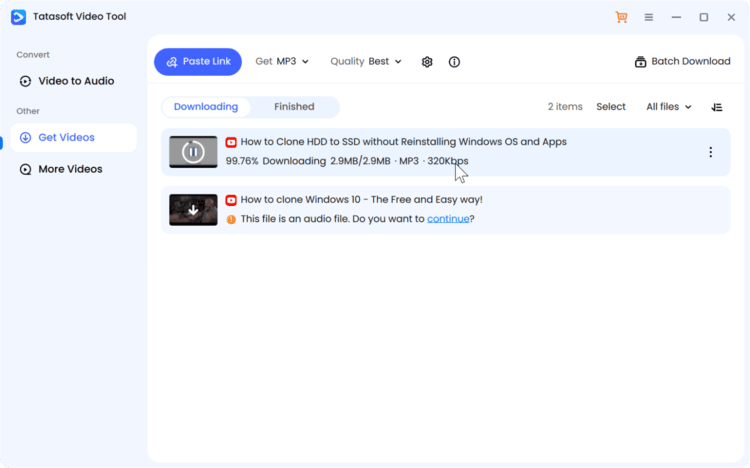
Access your converted MP3 by locating the saved file in the output folder.
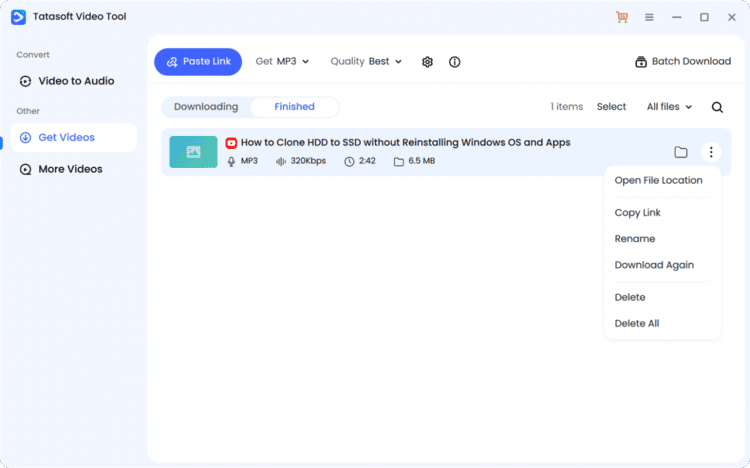
This streamlined workflow allows users to create clean, metadata-rich MP3s within minutes, no browser ads, pop-ups, or quality loss.
For researchers, creators, or educators who frequently save multiple Facebook videos, or for those managing a large archive, don’t do them one by one. You can queue dozens of URLs simultaneously. This is a lifesaver when I need to convert YouTube video to MP3 alongside my Facebook finds to create a unified playlist..
With Tatasoft Video Tool:
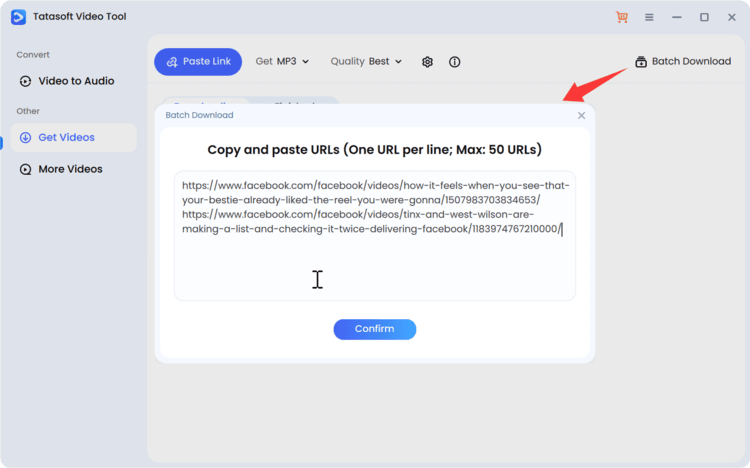
Batch processing transforms time-consuming individual conversions into an automated, organized system that boosts productivity and consistency.
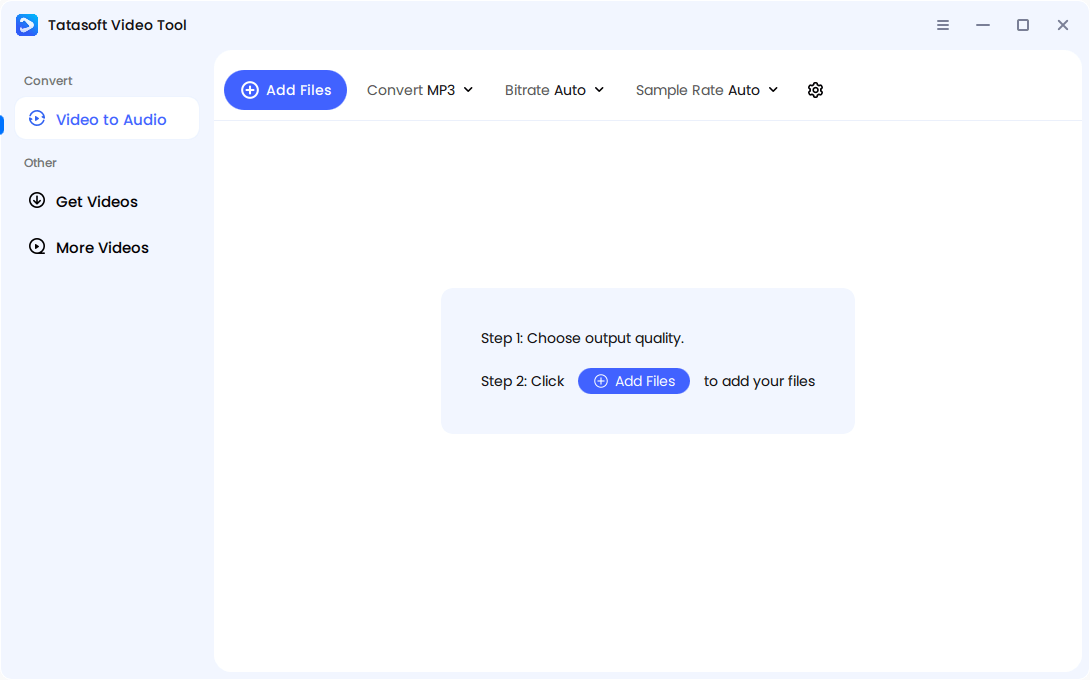
If you have downloaded the Facebook video to local drive and want to convert it to MP3, or realize you only need the audio to save space on your phone, the software can also help you.
In Tatasoft, switch to the Video to Audio option > Choose the type as MP3 > set the Bitrate and Sample Rate > then elect the Facebook video you downloaded. This allows you to import MP4 or MOV files from your hard drive and transcode them into MP3s. It's a great way to "clean up" your storage—an MP3 is typically 90% smaller than its HD video counterpart.
The popularity of Facebook as a multimedia hub has made it one of the richest sources of video content online. From motivational clips to music performances and podcasts, there’s a constant demand to extract only the audio portion for convenience and storage.
Why bother extracting audio? Based on user feedback and my own habits, there are three primary drivers:
By converting Facebook video to MP3, users make the most of Facebook’s rich content ecosystem in a format that’s easy to manage and versatile. If you are new to this, learning how to convert online video to MP3 is a fundamental digital literacy skill.
Facebook uses Adaptive Bitrate Streaming (ABR). This means the video and audio are delivered in separate "chunks" that change quality based on your internet speed.
| Features | YouTube | TikTok | |
|---|---|---|---|
| Audio Format | AAC (usually) | Opus / AAC | AAC |
| Typical Bitrate | 96 - 160 kbps | Up to 160 kbps | 128 kbps |
| Extraction Ease | Moderate | Easy | Easy |
MP3 extraction becomes valuable for:
Preserving this audio makes the content more accessible and flexible across devices—phones, tablets, and even car systems.
Professional tools like Tatasoft don't just "record" the sound; they demux the stream, extracting the highest available audio quality without re-encoding it into a lower-tier format.
Before you convert Facebook video to MP3, it’s important to respect ownership and copyright policies. While Facebook allows users to download their own content, downloading copyrighted material without permission could breach digital laws or the creator’s rights.
Before you click convert, remember that content creators work hard on their media. I always follow these personal rules:
Responsible use ensures that you enjoy MP3 conversion benefits without violating digital content regulations.
The quality of an MP3 extracted from Facebook depends on several factors beyond just the converter used.
Main determinants include:
By optimizing these elements, you can ensure that the MP3 maintains the natural tone, clarity, and depth of the original recording.
Facebook compresses videos heavily to optimize streaming speeds. This compression affects not only visuals but also the embedded audio track.
When converting Facebook videos to MP3, compression may:
However, using professional-grade tools like Tatasoft Video Tool minimizes these issues by accurately decoding and reconstructing the sound file during conversion. It ensures better audio fidelity even when the source material is compressed.
Metadata plays a crucial role in maintaining organized MP3 collections. It includes the title, artist, duration, upload date, and sometimes thumbnail art.
When you convert Facebook video to MP3, a reliable converter should:
Tatasoft Video Tool automatically assigns logical metadata labels to exported MP3s, allowing users to categorize files for playlists, projects, or archives efficiently.
As Facebook expands its short-form and live video formats, its video handling technology continues to evolve. However, MP3 extraction remains essential for users who prefer offline or portable audio formats.
Future trends may include:
Despite growing alternatives like FLAC or AAC, MP3 continues to offer the best balance between quality, compatibility, and file size—ensuring its ongoing importance in digital media.
Converting Facebook video to MP3 is an efficient way to preserve valuable audio content in a format that’s easy to store, share, and enjoy anywhere. It isn't just about saving files; it's about making content work for your lifestyle. By moving audio off the social grid and into your pocket, you regain control over how you consume information.
Tatasoft Video Tool has consistently been my "Swiss Army Knife" for this task—it's fast, respects the original audio fidelity, and handles the technical heavy lifting so I don't have to. Start using Tatasoft Video Tool today to convert Facebook videos to MP3 effortlessly and experience superior sound quality every time.
A dedicated technical writer at Tatasoft with over four years of specialized expertise in computing technology. She crafts actionable, user-centric content for tech niches, specializing in disk cloning, data management, and video solutions for Windows and Mac.
Read full bio
This article has been approved by Ben Lee. Ben's dedication to excellence and his comprehensive knowledge of Windows and Mac technologies make him an essential part of any technical writing team. With a career marked by continuous learning and adaptation to new technologies, Ben remains at the forefront of the ever-evolving tech landscape.