
Written byJanet BashorunUpdated on Mar 16, 2026

Brief introduction: YouTube is the world’s largest library of music, but it has one major flaw: it requires an active internet connection and keeps your screen on. As a content creator who relies on offline audio for research and inspiration, I’ve found that a reliable YouTube to MP3 workflow is essential.Forget sketchy converters that bundle malware with low-quality audio. This guide explains how to safely convert YouTube to MP3 using Tatasoft Video Tool, ensuring you get high-quality files every time without the risks.
In this article

In my years of managing digital assets, I’ve seen users move far beyond simple playlists. Converting YouTube to MP3 has become a vital step for creators and professionals who need high-quality audio building blocks. Here’s how you can get creative:
These applications show that MP3 conversions aren't just about personal playlists—they’re tools for learning, creativity, and professional growth.
Beyond personal use, professionals and industries also leverage YouTube to MP3 conversions:
However, not all YouTube to MP3 converters are safe, reliable, or legal. This guide explains the best and safest ways to convert YouTube videos to MP3 files, the benefits of doing so, and why Tatasoft Video Tool is one of the most trusted tools for the job.
For professionals who need crystal-clear sound, Tatasoft Video Tool is the gold standard. It’s a dedicated YouTube video downloader that prioritizes your PC's security and audio fidelity.
Unlike basic tools, this software allows you to save YouTube videos offline first and then extract the audio, ensuring no data packets are lost during the process. If you ever need the visuals later, you can also easily convert YouTube to MP4 within the same interface.
Why Tatasoft Stands Out Among YouTube to MP3 Tools
| Feature | Tatasoft Video Tool | Typical Online Sites |
|---|---|---|
| Max Quality | 320kbps (High Fidelity) | 128kbps (Standard) |
| Batch Processing | Yes (Download whole playlists) | No |
| Safety | Verified Secure & Ad-free | High risk of Malware |
| Success Rate | 99.9% | Often "Link Expired" |
Based on my daily usage, here is the most efficient way to get your audio files:
Scenario 1: Convert Existing Local YouTube Videos to MP3
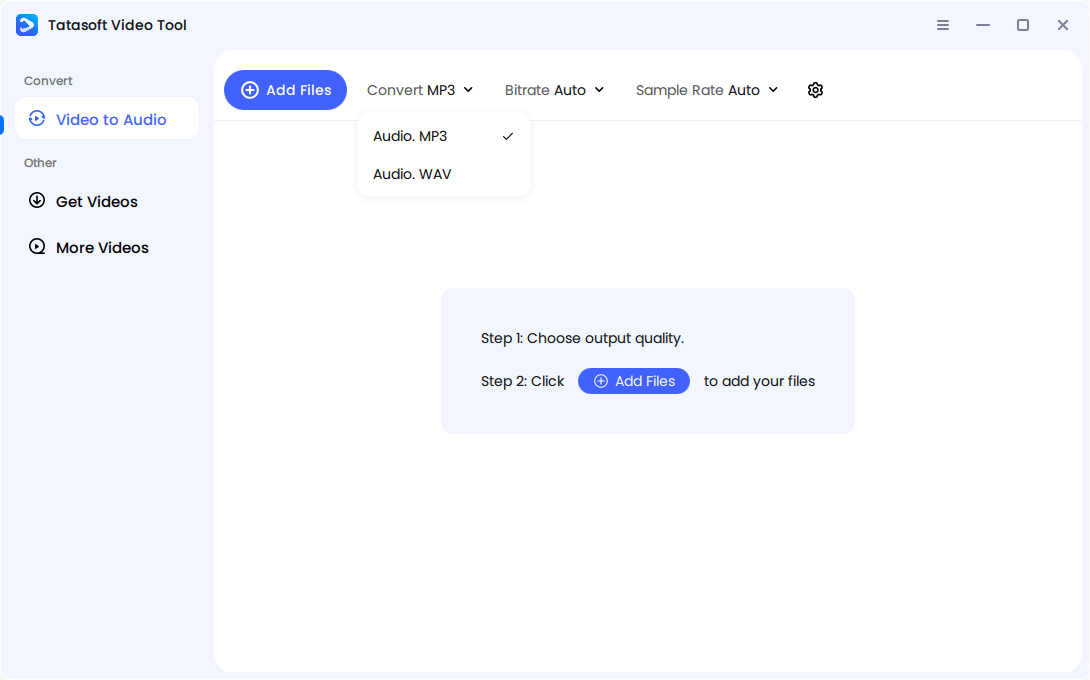
Step 1: Select MP3 Format: Launch Tatasoft Video Tool > Video to Audio > Click the drop-down icon after Convert and choose Audio. MP3 as your preferred format.
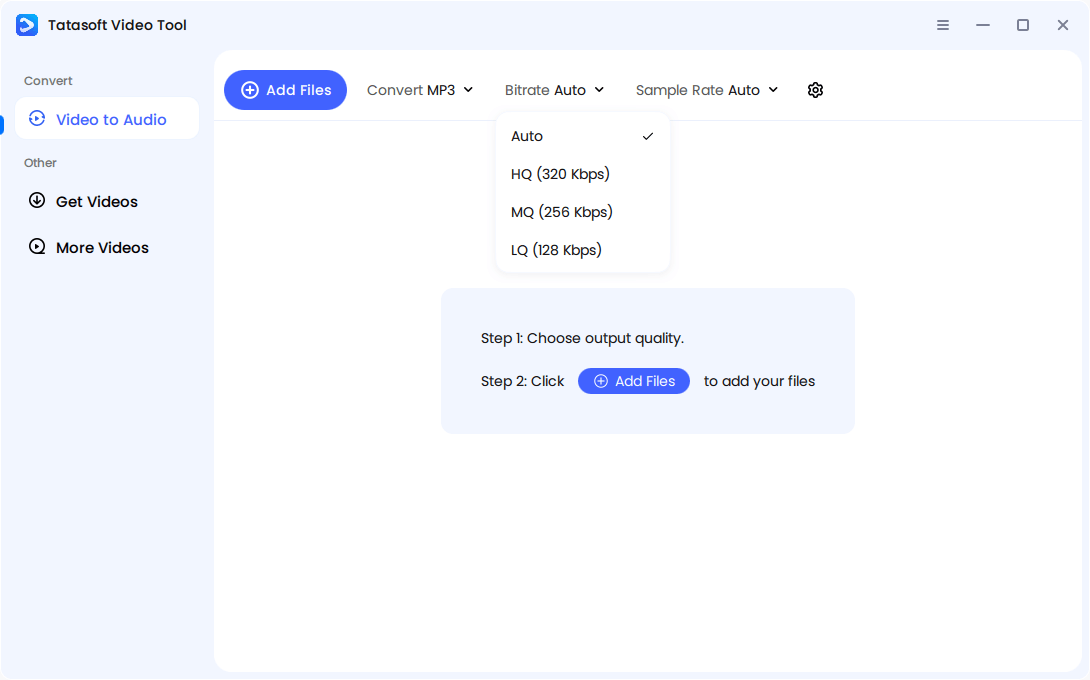
Step 2: Select Audio Quality: Select the desired audio quality (e.g., 128kbps for smaller size, 320kbps for high fidelity).
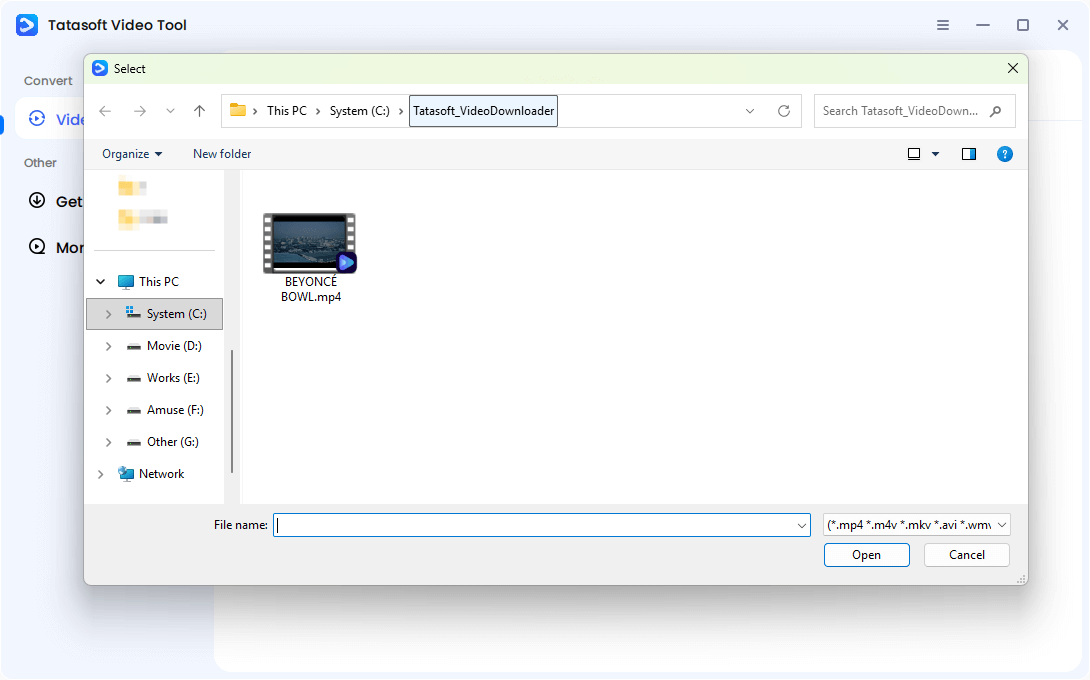
Step 3: Choose the YouTube video you downloaded: Click Add Files > locate and select the YouTube video you want to convert.
Step 4: Start Conversion and Access: After selecting the video file, Tatasoft will extract the audio and save it to your device within seconds. Once finished, right click the three vertical dots (⋮) icon > click Open File Location to check the MP3 file. Organize downloaded MP3s into playlists, folders, or sync them with music apps for offline use.

Scenario 2: Direct Download & Convert YouTube URL to MP3
This is the most popular "one-step" method. If you have a URL and want to convert online video to mp3 immediately:
Step 1: Copy the URL: Go to YouTube and copy the link of the video you want to save.
Step 2: Choose MP3 format and audio quality: Launch Tatasoft Video Tool > Get Videos > Select Get Audio.MP3 format and the output quality.
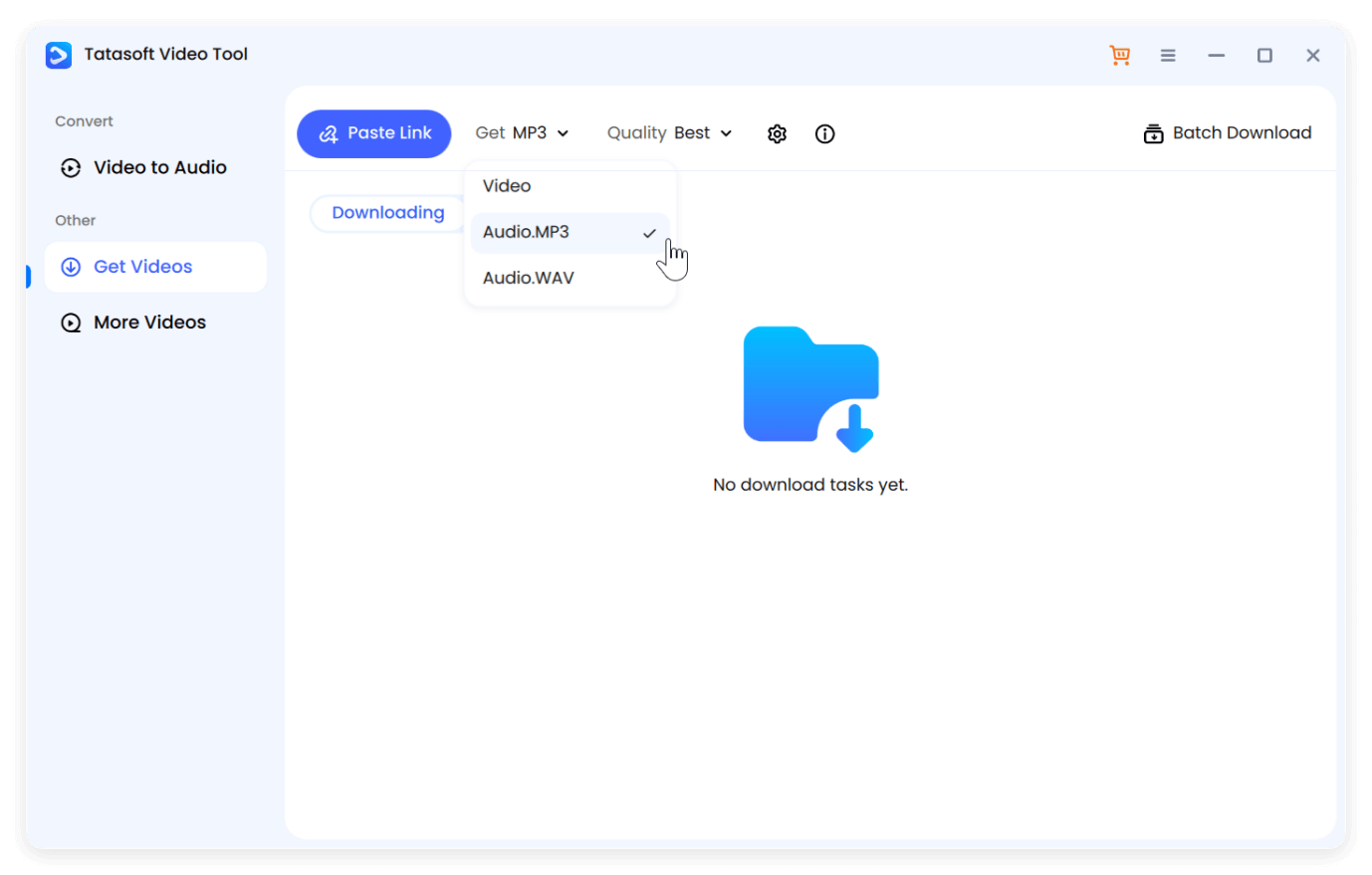
Step 3: Paste the YouTube Video URL: Click Paste Link to continue. The software will automatically analyze the link.
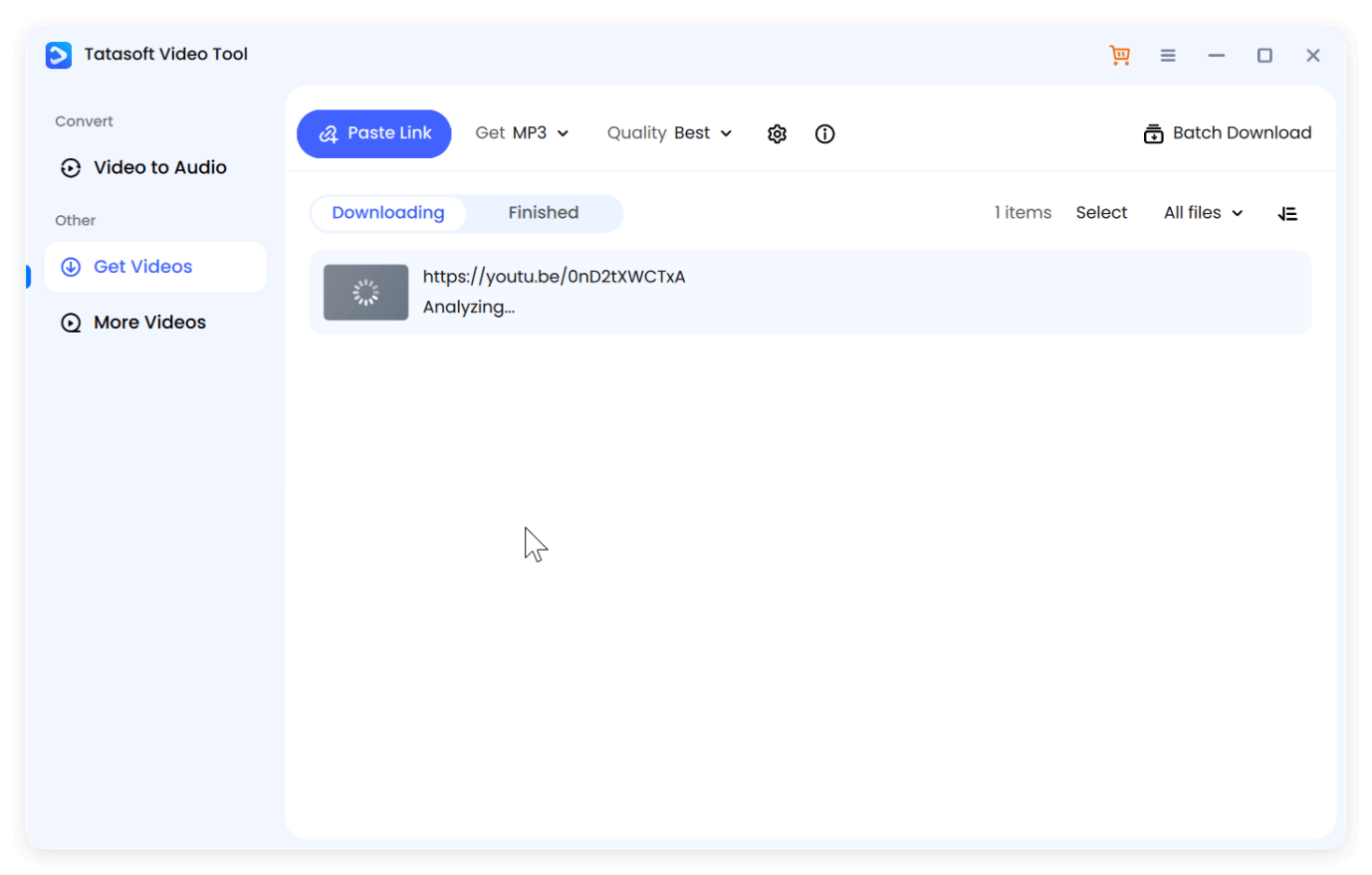
Step 4: Confirm to Download As Audio File: Click continue to start to download and save the video to MP3 directly to your device.
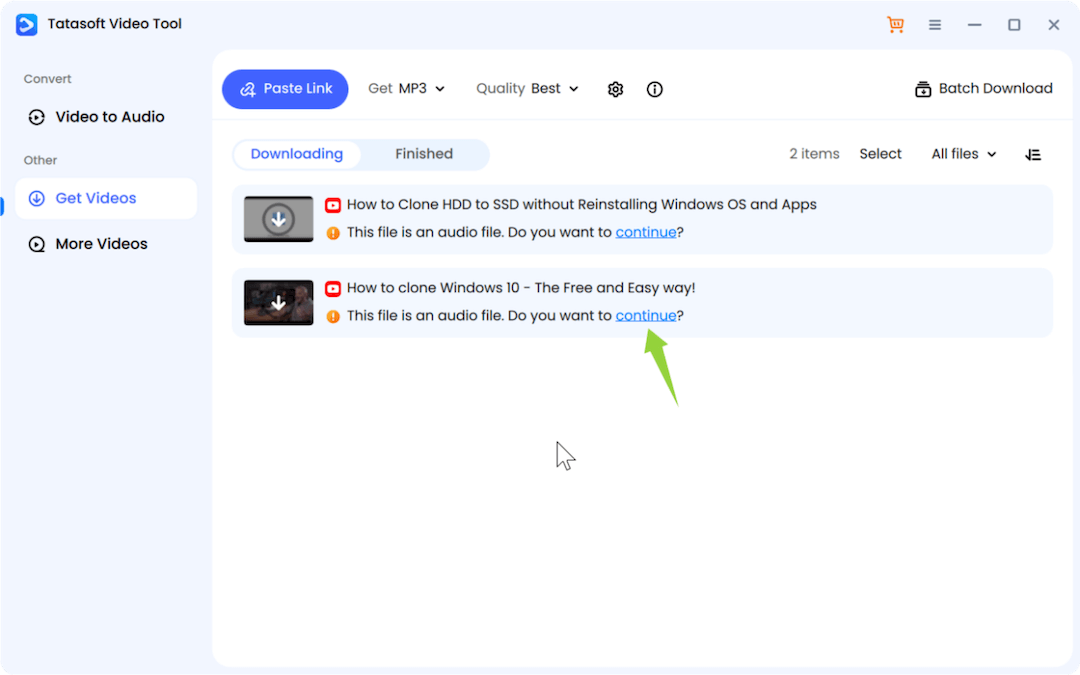
With this method, you avoid common issues like broken links, malware, or low-quality sound that plague free converters.
Many users ask me if they should choose MP3 or WAV. While MP3 is the most compatible, if you are doing professional sound editing, you might want to look into YouTube to WAV conversion for lossless quality. However, for 99% of users, a 320kbps MP3 provides the perfect balance of small file size and high-fidelity sound.
These benefits explain why MP3 remains the world’s most widely adopted audio format.
As media habits evolve, YouTube to MP3 continues to hold a key place in audio consumption:
YouTube to MP3 is more than a technical process—it’s a way of empowering people to enjoy music, education, and information offline, anytime, anywhere. From personal uses like study playlists and workouts to professional applications in education, journalism, and NGOs, MP3 conversions are both practical and versatile.
As digital media habits evolve, relying on Tatasoft Video Tool grants you true independence from the limitations of streaming platforms. It’s a high-performance solution that prioritizes security while meticulously preserving the high-fidelity audio quality intended by the creators—whether you are archiving a podcast or choosing to convert Facebook video to mp3.
Get your first 5 downloads for free! Test the speed and high-fidelity quality of Tatasoft Video Tool on your PC at zero cost.
A dedicated technical writer at Tatasoft with over four years of specialized expertise in computing technology. She crafts actionable, user-centric content for tech niches, specializing in disk cloning, data management, and video solutions for Windows and Mac.
Read full bio
This article has been approved by Ben Lee. Ben's dedication to excellence and his comprehensive knowledge of Windows and Mac technologies make him an essential part of any technical writing team. With a career marked by continuous learning and adaptation to new technologies, Ben remains at the forefront of the ever-evolving tech landscape.