
Written byJanet BashorunUpdated on Jan 18, 2026

Brief introduction: For creators and marketers, the need to download Pinterest video content is a professional necessity. Since saved Pins can be deleted or restricted at any time, relying on the platform alone is risky. To ensure your inspiration remains accessible in high resolution, Tatasoft Video Tool provides the ultimate solution. This guide explores how to download Pinterest video safely and preserve your favorite creative assets offline without losing resolution.
In this article

Pinterest is no longer just a platform for pinning pretty ideas — downloading videos from it has become a form of digital collecting. People don’t just browse inspiration anymore; they want to save, repurpose, and organize content in ways the app doesn’t fully support.
Many users assume that hitting the "Save" button on a Pin is enough. However, saving to a board does not give you ownership of the file. To truly download Pinterest video files, you need to look beyond the platform's native features. The Reality of the "Save" button:
When a direct Pinterest video download option isn't available, users often resort to manual workarounds. Here is how they stack up:
1. Screen Recording
This is the most basic way to download Pinterest video content on mobile.
2. Online Video Downloaders
Web-based tools allow you to paste a link to get a file.
3. Browser Developer Tools
Advanced users use "Inspect Element" to find the video source URL in the network tab.
Each of these methods feels like a shortcut but fails in reliability, speed, and quality. They’re fine for occasional personal use but unsuitable for serious workflows or archiving.
If you need to download Pinterest videos regularly, manual shortcuts eventually fail. For creators and marketers, professional video downloading software like Tatasoft Video Tool is the gold standard for efficiency.
| Feature | Manual Methods | Tatasoft Video Tool |
|---|---|---|
| Video Quality | Compressed/Low | Original HD/4K |
| Batch Support | No | Yes |
| Watermarks | Often Present | None |
| Safety | Risky Ads/Redirects | Secure & Local |
| Speed | Slow/Manual | High-Speed |
For those who want to download Pinterest videos without the noise and security risks of free web tools, Tatasoft Video Tool provides a stable, scalable workflow. It gives users full control without the noise and risks of free web tools. It’s built for professionals who value quality and efficiency.
Key Benefits:
Users no longer have to rely on unstable browser hacks or low-quality web tools. Instead, Tatasoft Video Tool centralizes the entire process and ensures every download maintains the original resolution and format, so the final output is usable immediately for editing, presentation, or inspiration boards.
Here’s how to download Pinterest videos using Tatasoft:
Step 1: Download and Install Tatasoft
Download and install the official website on Windows or Mac. The setup is fast and does not require plugins, extensions, or browser tweaks.
Step 2: Choose Format & Quality
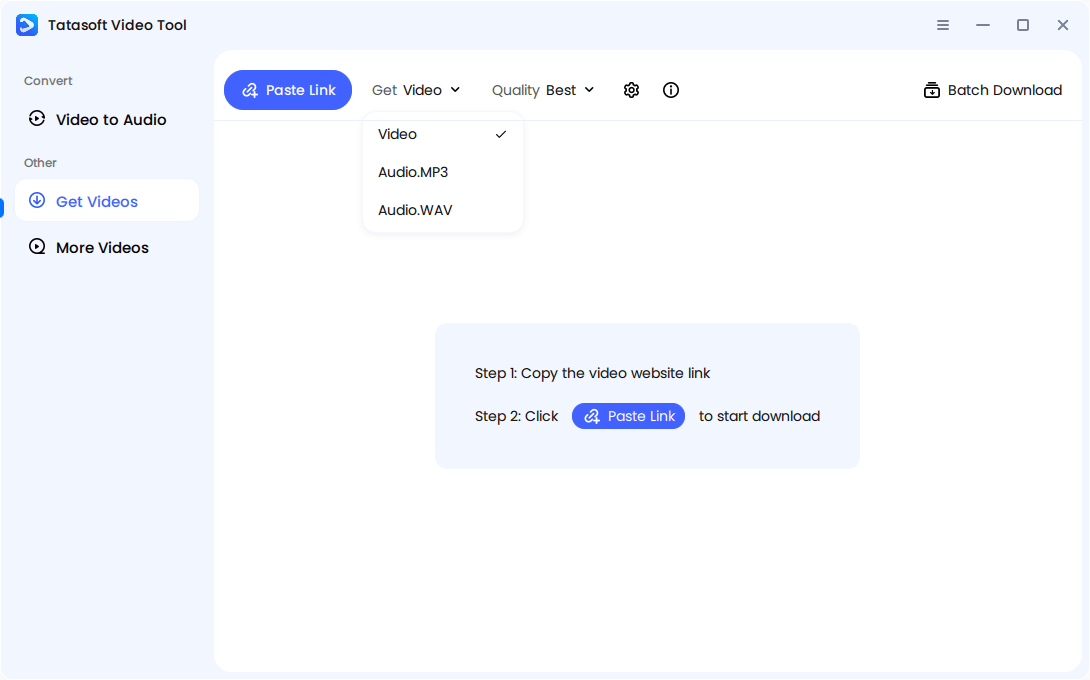
Launch Tatasoft and change to Get Videos. Select to download video and choose your preferred resolution, whether standard HD or higher.
Step 3: Copy the Video Link
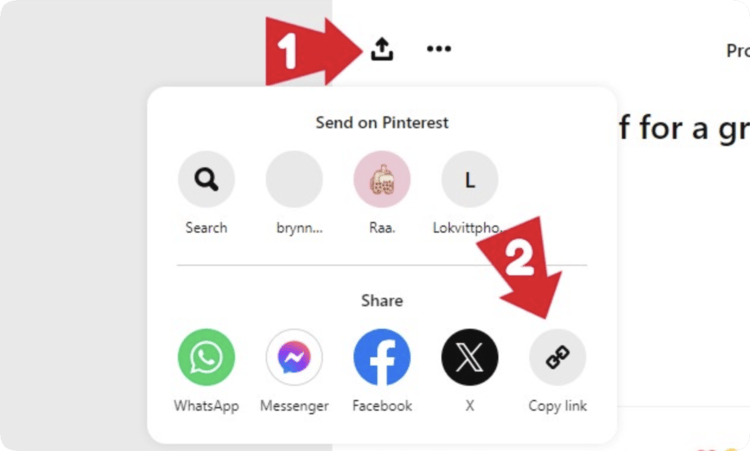
Open Pinterest, tap or click the Share icon, and select "Copy Link." This works for pins from boards, searches, ads, and profiles.
Step 4:: Paste into Tatasoft
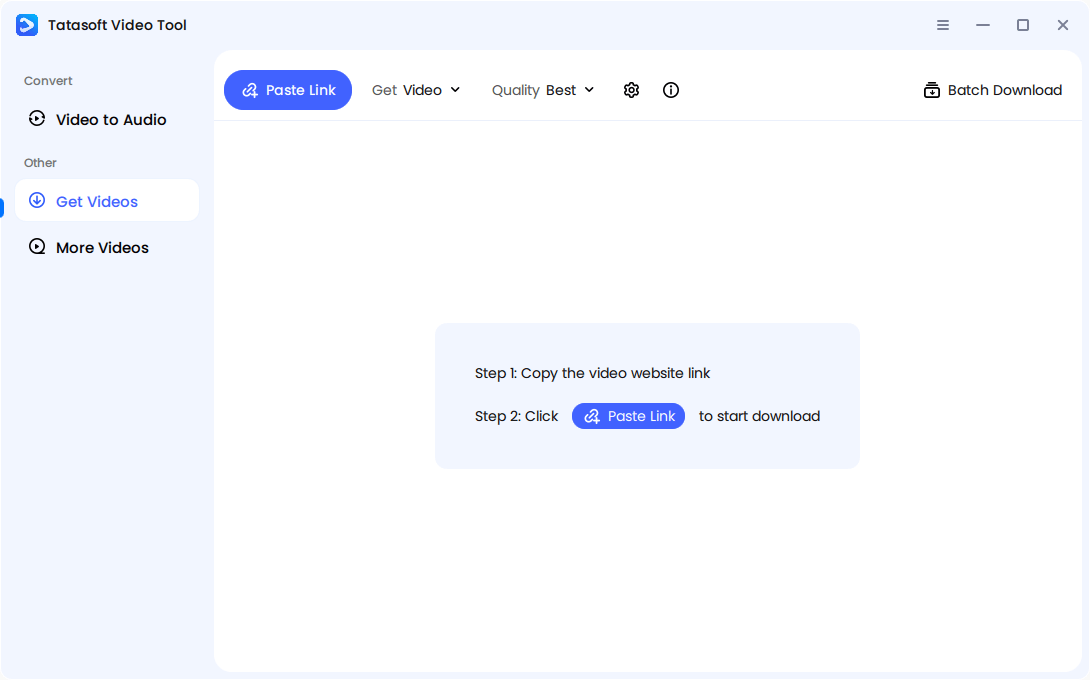
Turn the software and click Paste Link button to paste the URL into the software. The app will detect the video automatically.
Step 5: Start Download
Click the download button to process the video. Most clips save in seconds, even in batch mode.
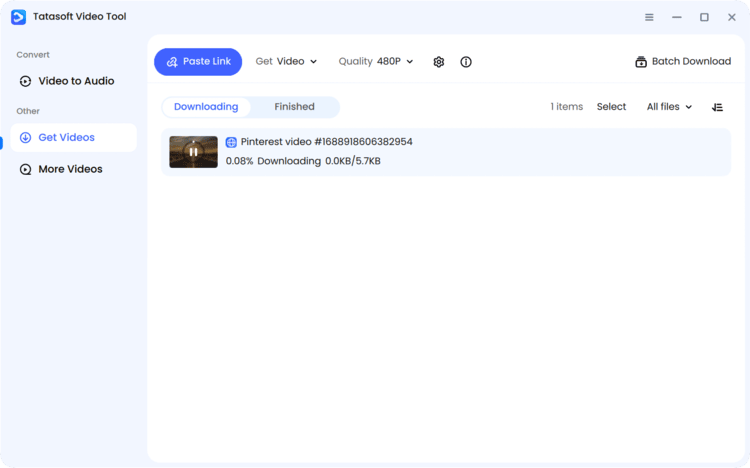
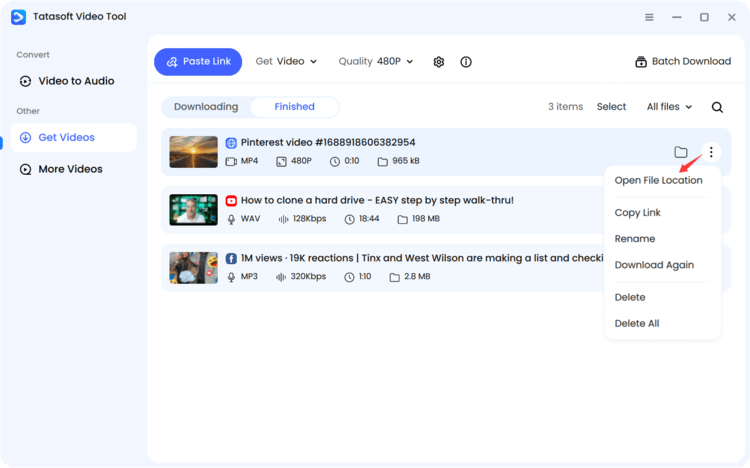
This workflow eliminates the need for technical hacks or repeated manual effort. Open your local library and use the video offline instantly. You can rename, move, edit, or archive files as needed.
Pinterest occasionally allows users to download videos directly, but this feature is not universal. It works only for Pins uploaded natively by creators who enable downloading. Even then, the quality and flexibility are limited.
How to Directly Download a Pinterest Video (If Available):
Limitations of the Direct Download Feature:
This feature is ideal for quick personal saves, but not for professionals. You can’t rely on it for consistent access, and most of the time, the "Download" option simply doesn’t appear. That’s why creators and marketers often explore other methods.
Unlike Instagram or TikTok, Pinterest avoids offering native downloads for most public videos. Here’s why:
| Pinterest Feature | What It Lets You Do | Why It’s Not a Real Download |
|---|---|---|
| "Save" to a Board | Bookmark videos into collections | Still requires Pinterest access |
| "Send" or "Share Link" | Forward to others or post online | Only links to original source |
| "Download" (Only on Some Pins) | Rare — appears on pins uploaded directly by certain creators | Usually compressed & may include platform watermark |
In short, Pinterest favors platform engagement over content ownership. They allow inspiration, but not extraction.
Most users assume every pin with a video should download just like an image, but Pinterest only enables downloads in very limited cases, often with reduced quality. Files may come with branding or formatting issues that make them unusable in editing or presentations. This limitation is why many turn to external methods, but not all solutions are equal.
Downloading Pinterest videos should be done responsibly not recklessly. Respect for creators protects the ecosystem and prevents long-term consequences. While having offline access gives users control, it also comes with accountability. Pinterest is a platform built on shared creativity, and abusing downloads can damage trust between creators, brands, and audiences.
Best practices include:
Many people assume that because content is public, it’s free to use however they want but that’s not true. Even if a pin has been reshared thousands of times, the original creator still owns the rights. Downloading should support learning, creativity, brand research, and archiving not content theft.
Ethical use builds trust and avoids takedowns or copyright disputes. When brands, influencers, or educators respect proper use, they protect their reputations and avoid unnecessary legal or platform-related risks. Responsible downloading ensures Pinterest remains a place where creators continue to share without fear of misuse.
Learning how to download Pinterest video content effectively transforms your creative process. Don't let your favorite inspirations get lost to broken links or deleted accounts. By moving away from unstable browser hacks and choosing a professional tool like Tatasoft Video Tool, you ensure that your digital library is high-quality, secure, and always accessible. It offering seamless support to download YouTube videos, save content from Facebook and Instagram, or archive trending clips from X (formerly Twitter).
Ready to build your offline collection? Get Tatasoft Video Tool today and turn your favorite Pins into a high-quality, organized video collection all under your control.
A dedicated technical writer at Tatasoft with over four years of specialized expertise in computing technology. She crafts actionable, user-centric content for tech niches, specializing in disk cloning, data management, and video solutions for Windows and Mac.
Read full bio
This article has been approved by Ben Lee. Ben's dedication to excellence and his comprehensive knowledge of Windows and Mac technologies make him an essential part of any technical writing team. With a career marked by continuous learning and adaptation to new technologies, Ben remains at the forefront of the ever-evolving tech landscape.