
Written byJanet BashorunUpdated on Mar 29, 2026

Brief introduction: If you've ever tried to grab a crisp audio track from a YouTube live session or a rare synth-wave mix on your Mac, you know the struggle. Online converters are often riddled with pop-ups, and screen recording usually results in a muffled mess. As a Mac user, you need a solution that respects your system's security and your ears' demand for high bitrate. In this guide, I'll share why a dedicated video downloader such as Tatasoft Video Tool is the best way to get studio-quality results without the headache.
In this article
Unlike casual listeners, Mac users often need files that play nice with "Pro" apps. Standard online rippers often deliver 128kbps files that sound "thin" on Studio Display speakers or high-end headphones.
Many tools claim to help users download audio from YouTube on Mac, but most don't align with how macOS handles security, formats, and performance. Here are the real reasons they fall short:
Most "free" tools are just Windows ports that feel clunky on macOS. When Mac users want to download audio from YouTube without quality loss, Tatasoft Video Tool offers a workflow that fits directly into the way macOS handles media, storage, and apps. It is built with the Mac user experience in mind—fast, clean, and optimized for Apple Silicon (M1/M2/M3/M4/M5 chips).
Here's how it stands out:
1. Built for macOS (Not Just "Compatible")
Many tools are simply ported from Windows, but this one is designed to function seamlessly on current and older macOS versions — including systems running on Apple Silicon. What this solves:
2. Direct Audio Extraction Without Extra Conversion
Instead of downloading video first and converting manually, it pulls only the audio file straight from the YouTube URL. Results:
3. Mac-Friendly File Output
Files save with proper naming and formats that open instantly in Finder, Music app, QuickTime, or audio editors. No issues with:
4. Stable Downloads Without Browser Restrictions
Unlike temporary extensions or unverified apps, this tool doesn't break after a browser update or require risky permissions.
5. Metadata Preservation
Where supported, it retains titles and base metadata so you're not left with “Unknown Track 01” in your library.
Step 1: Copy your YouTube URL: Copy the URL of the video that contains the audio you want.
Step 2: Select audio format: Run Tatasoft Video Tool > turn to Get Videos > Choose MP3 or WAV depending on your use case. If needed, you can also change the Quality option. For visual reference, you can select to convert YouTube to MP4.
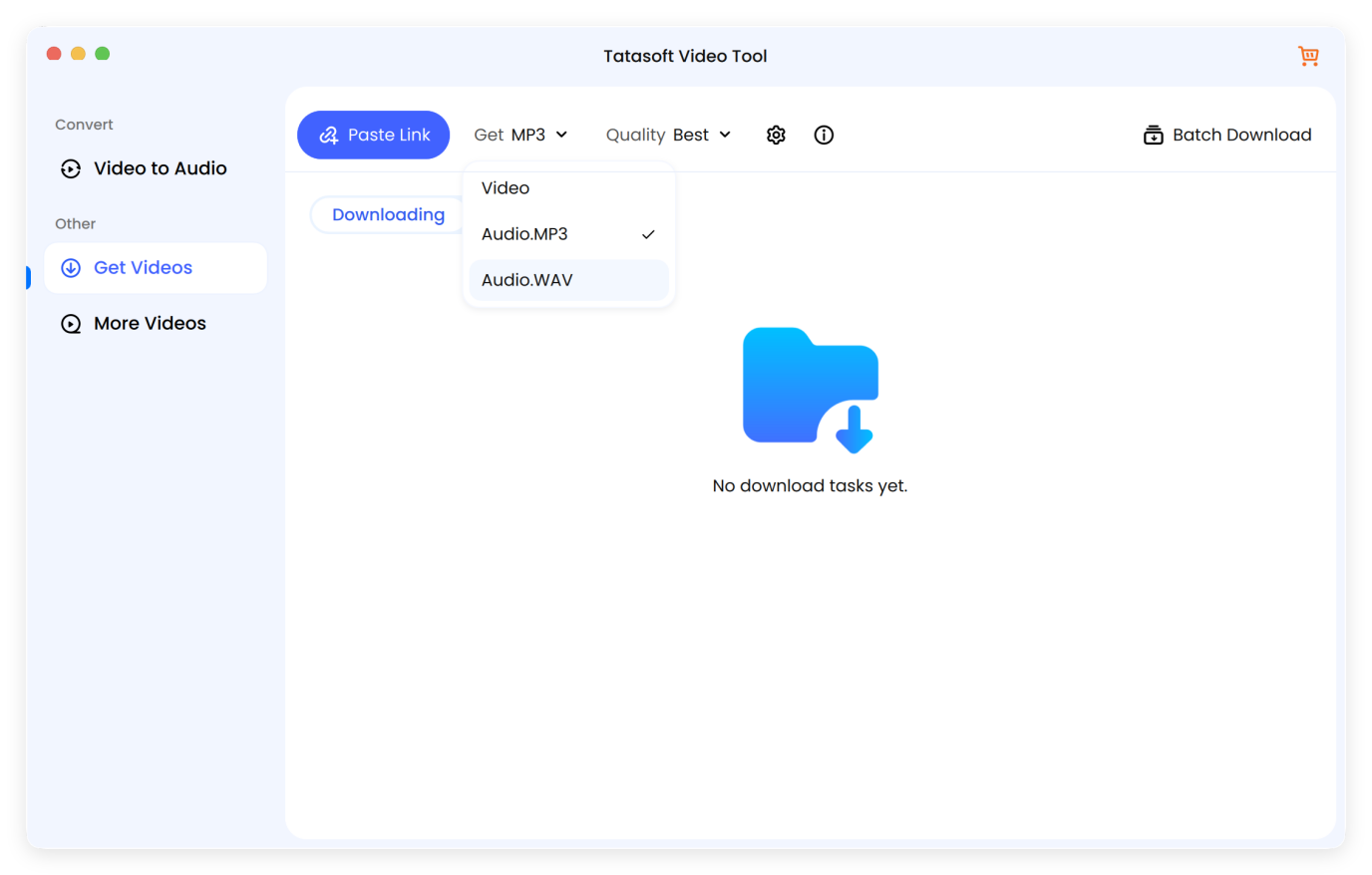
Step 3: Paste the YouTube link: click Paste Link. The software will start to analyze the link for audio information.
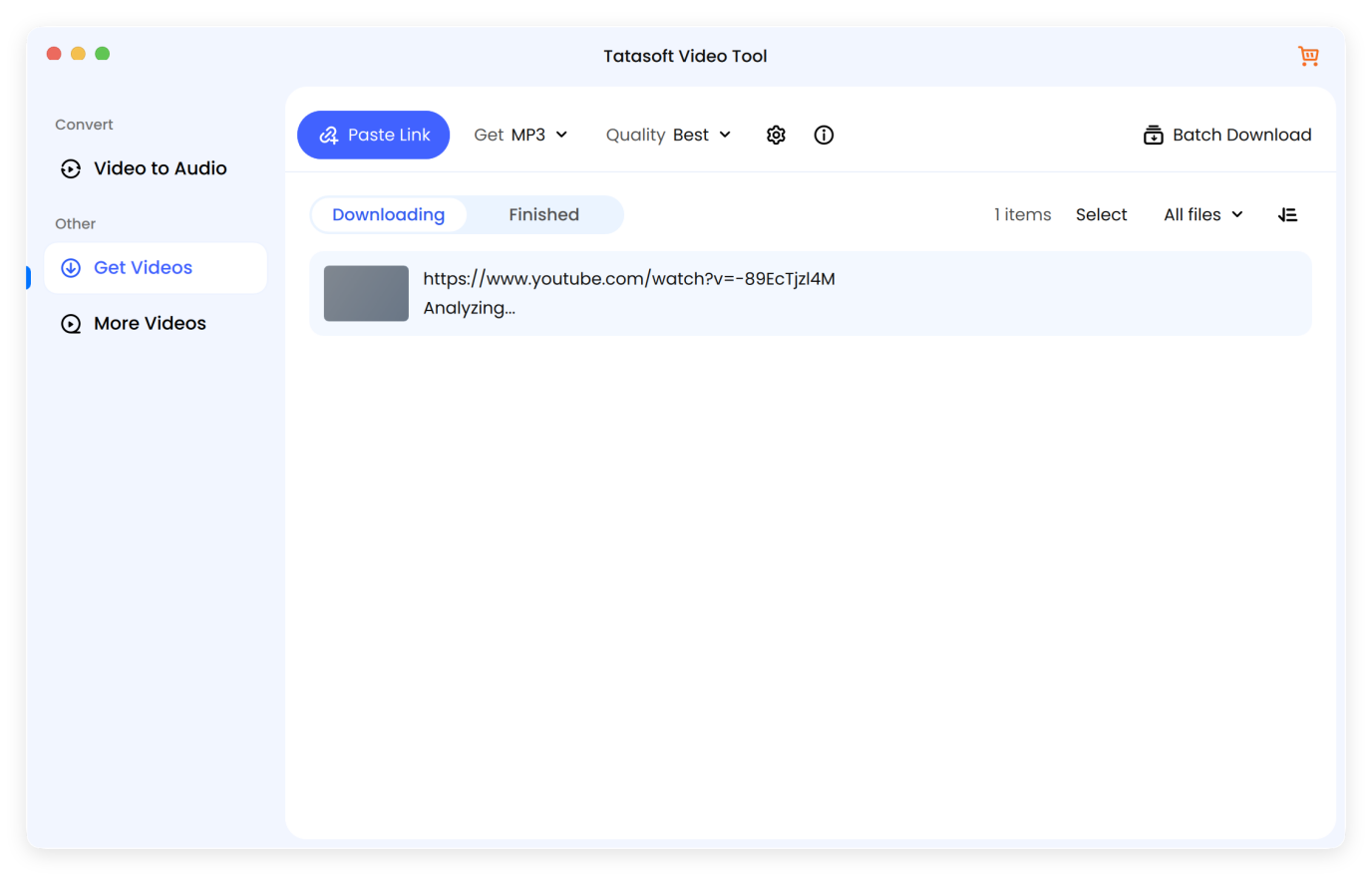
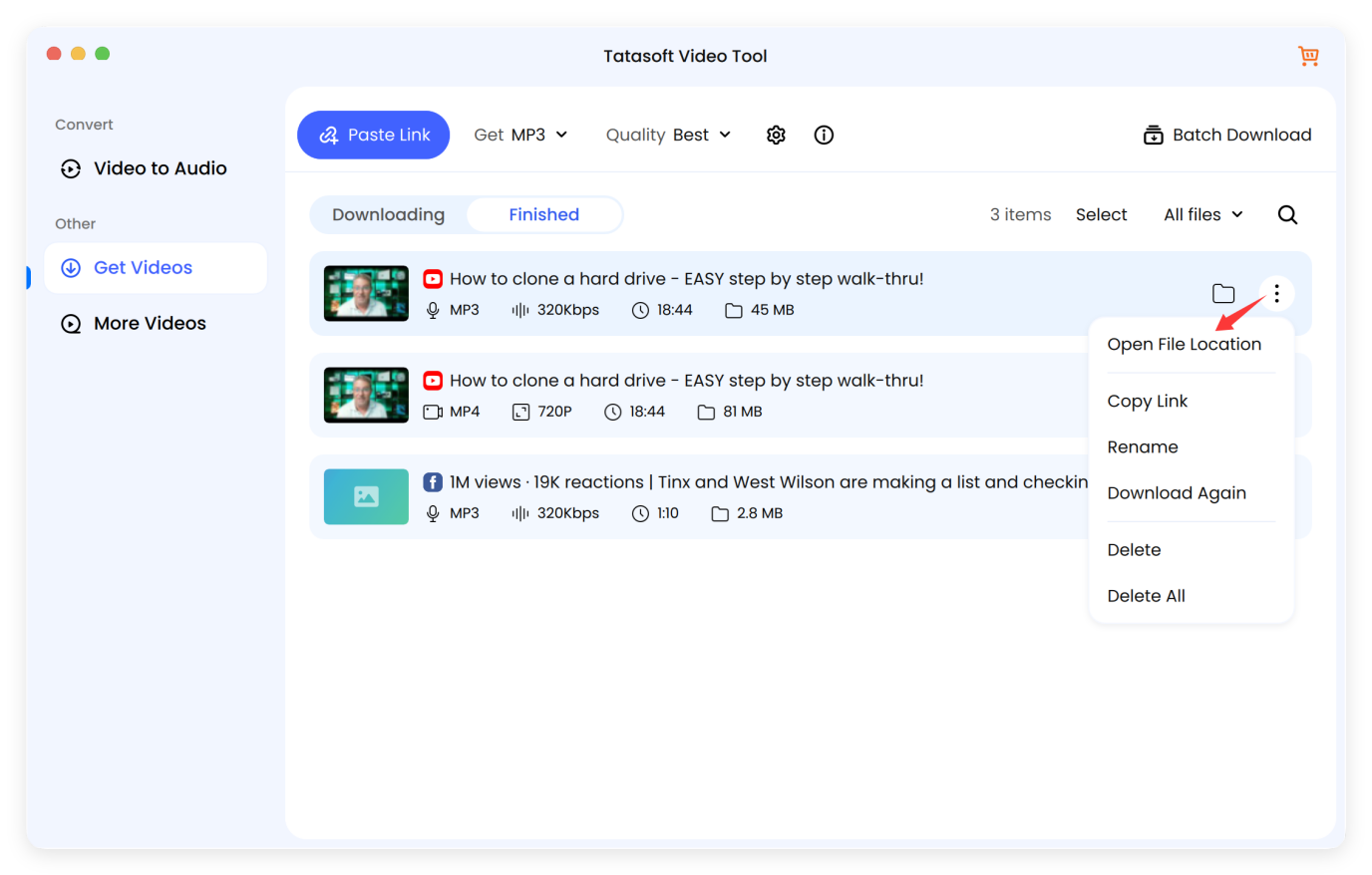
Step 4 Confirm to download audio file: Click Continue. The software doesn't "record" the audio (which would include system beeps or notifications); it extracts the digital stream directly from the source servers.
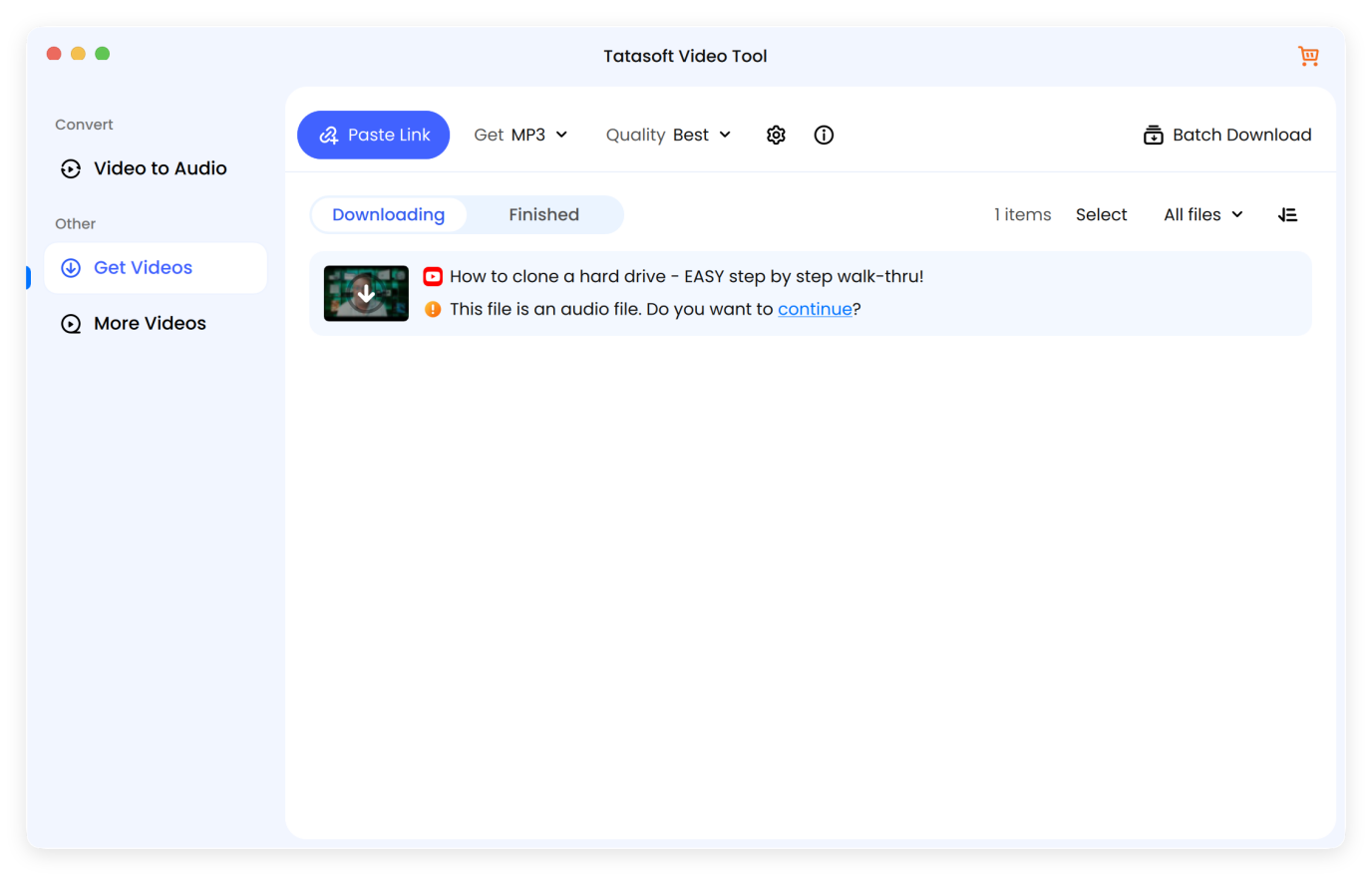
It will start downloading audio from YouTube link. The extraction happens in the background. Because it's optimized for Mac, it won't hog your RAM while you're working in other apps. Once done, your file is ready in Finder. You can instantly drag it into the Music app or sync it to your iPhone for offline listening.
When you download audio from YouTube on Mac, not all files are created equal. Here are three "insider" tips for better results:
| Factor | Professional Recommendation | Why it Matters |
|---|---|---|
| Bitrate | 256kbps or 320kbps | Higher bitrates preserve the "depth" of the sound, especially in the high and low frequencies. |
| Sample Rate | 44.1kHz or 48kHz | Matches the standard for CD and Video production, preventing "pitch" issues in editing apps. |
| Metadata Tags | Use "Keep Metadata" | Ensures the Artist, Title, and Thumbnail are saved, so your Music library stays organized. |
Pro Tip: If the YouTube video resolution is only 360p, the audio quality will likely be poor regardless of the tool you use. Always look for "Official Audio" or 1080p+ videos for the best audio source.
Once users download audio from YouTube on Mac, they rarely keep it idle — they apply it across different creative, personal, and professional uses. Here are the most common ways Mac users repurpose extracted audio:
By downloading audio from YouTube, Mac users transform content into assets they can reuse across apps, devices, and projects without streaming constraints.
Even when you successfully download audio from YouTube Mac, a file may refuse to play, sound distorted, or appear unusable. Instead of deleting it and starting over, most issues can be fixed quickly when you know what to look for.
Solutions to download audio from YouTube on Mac work best when they combine quality, safety, and long-term usability. Mac users aren't just trying to save sound — they're building offline playlists, editing clips for projects, syncing to devices, or archiving rare performances. That's why relying on temporary websites, unstable browser extensions, or unclear file formats leads to frustration instead of results.
By using Tatasoft Video Tool, you're not just saving a file; you're ensuring your offline library is high-quality, safe, and ready for any creative project. It’s a specialized utility designed to download YouTube videos on Mac and extract their audio layers with surgical precision, maintaining the original fidelity of the source. From the crisp highs of an MP3 to the uncompressed depth of a WAV file, you now have the power to build a collection that sounds as good as it looks on your Mac.
A dedicated technical writer at Tatasoft with over four years of specialized expertise in computing technology. She crafts actionable, user-centric content for tech niches, specializing in disk cloning, data management, and video solutions for Windows and Mac.
Read full bio
This article has been approved by Ben Lee. Ben's dedication to excellence and his comprehensive knowledge of Windows and Mac technologies make him an essential part of any technical writing team. With a career marked by continuous learning and adaptation to new technologies, Ben remains at the forefront of the ever-evolving tech landscape.