
Written byJanet BashorunUpdated on Mar 20, 2026

Brief introduction: As YouTube Reels and Shorts dominate our digital diet, the frustration of "unavailable" or deleted videos is a common pain point for creators and fans alike. While the platform excels at streaming, it lacks a native way to build a permanent, high-quality offline archive. This guide shares my hands-on experience using Tatasoft Video Tool to bypass these limitations, allowing you to save YouTube Reels offline with professional-grade reliability.
In this article

YouTube Reels have redefined how we consume quick tutorials, viral trends, and creative inspiration. However, the fleeting nature of short-form content means your favorite clips can disappear instantly due to creator deletions or regional blocks. While many users rely on mobile data, the smartest way to preserve high-fidelity content is to save YouTube videos offline. Before initiating a YouTube Reels download, you must evaluate a few critical factors that influence both quality and legality.
Many users consider a YouTube Premium subscription for its "Smart Downloads" feature. While convenient for casual mobile viewing, it has significant limitations compared to a dedicated YouTube Video downloader like Tatasoft Video Tool.
The Limitations of YouTube Premium Downloads:
Unlike the subscription model, Tatasoft Video Tool allows you to download YouTube Shorts as standard MP4 or MKV files. This gives you the freedom to save online videos for local storage, ensuring your inspiration remains accessible forever—even without an active internet connection or subscription.
| Feature | YouTube Premium (Official) | Tatasoft Video Tool (Recommended) |
|---|---|---|
| File Access | Locked inside YouTube App | Open MP4/MKV/AVI Files |
| Editing | Impossible | Fully Editable in any Software |
| Audio Only | No separate export | Convert to MP3/WAV |
| Batch Downloads | Not available | Fully supported |
| Permanent Save | No (Expires offline) | Yes (Permanent local copy) |
Step 1: Download and Install. Free download Tatasoft Video Tool from the official website and follow the on-screen installation guide.
Step 2: Copy YouTube Reel Link. Go to the YouTube Reels page and copy the video’s URL from your browser.
Step 3: Select Quality. Launch Tatasoft > Get Videos > Choose the desired resolution from standard to high definition.
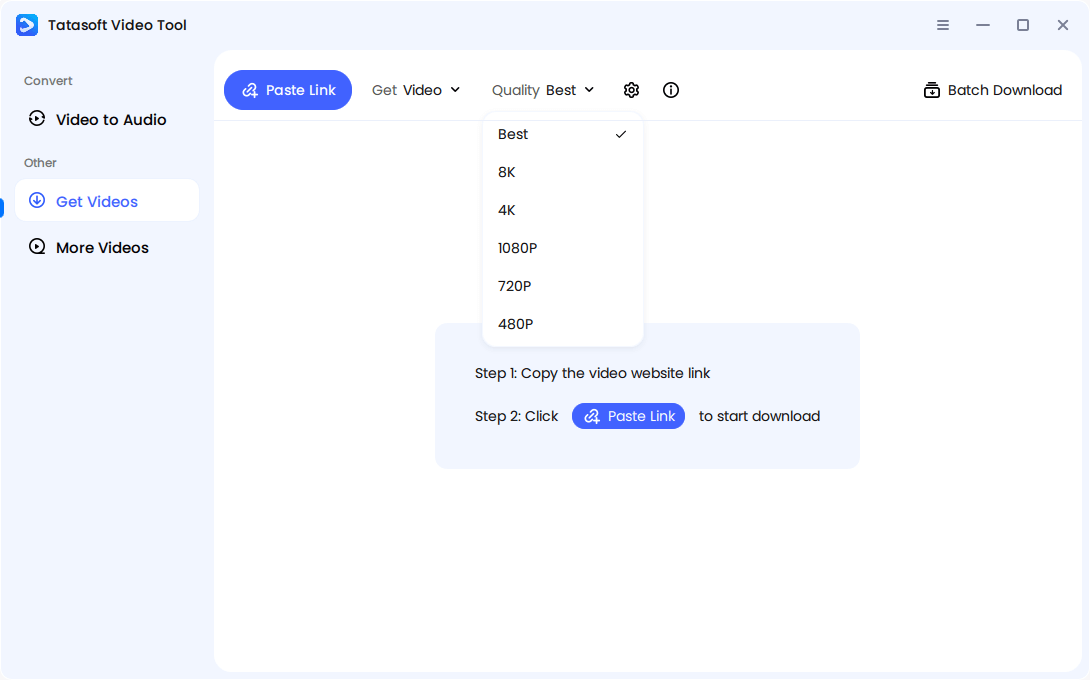
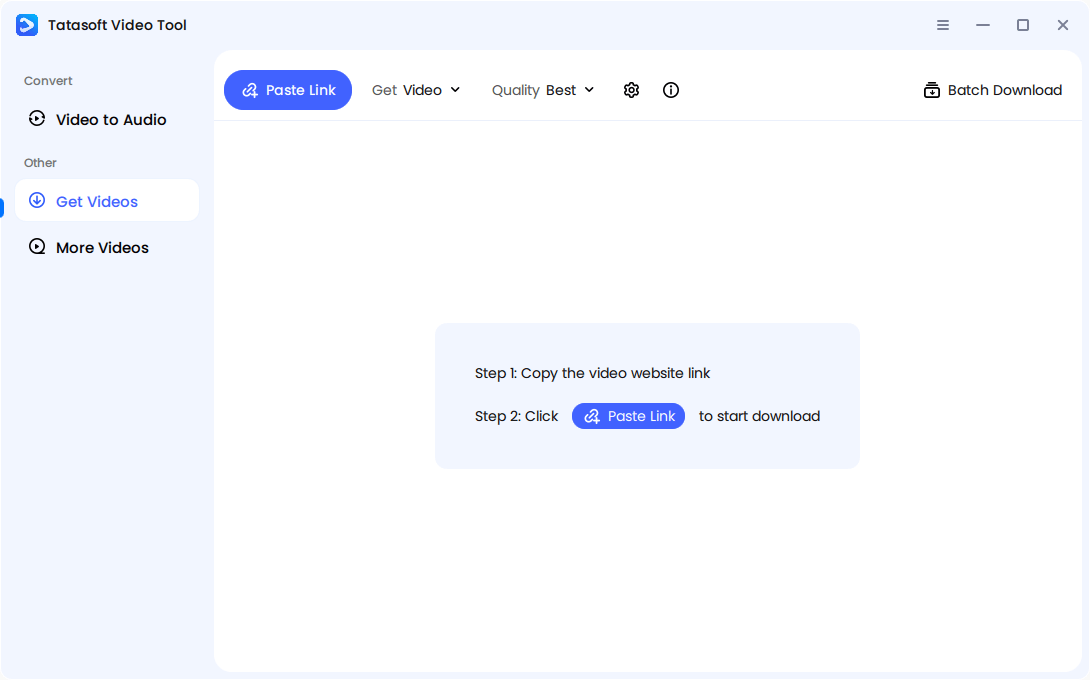
Step 4: Paste in Downloader. Paste the link in the designated box by clicking the Paste Link button. The software will start to analyze the link immediately.
Step 5: Start Download and Save. Wait for the downloading and access the video in your chosen folder once the process completes.
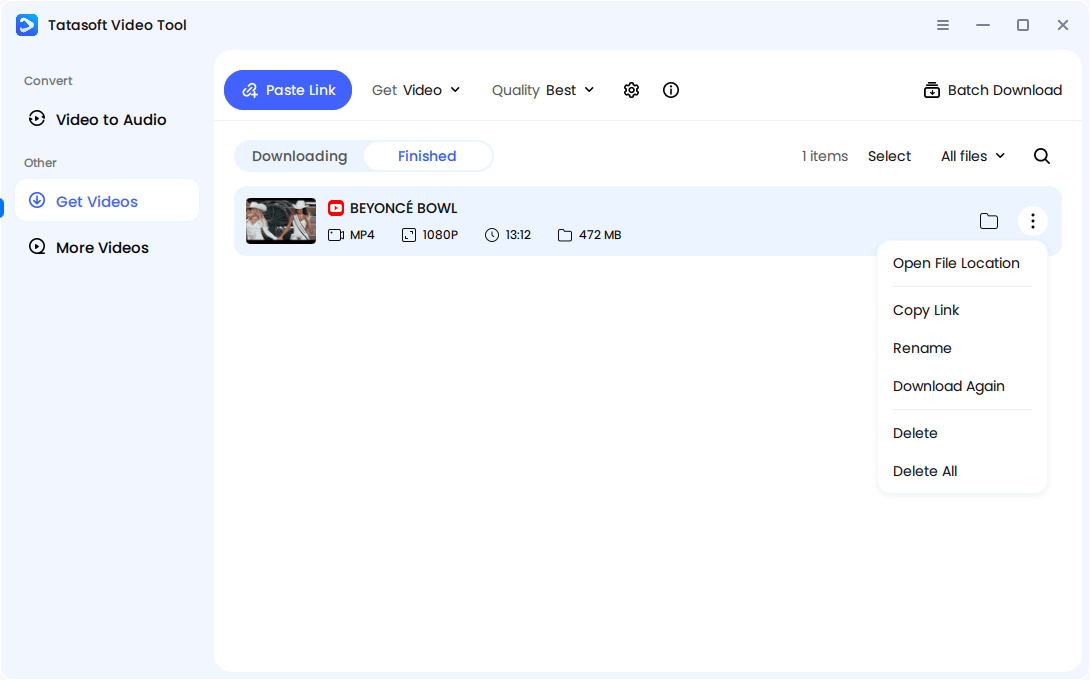
The process is intuitive and beginner-friendly. Even users with minimal technical skills can confidently download Reels without encountering corrupted files or lagging performance.
Even reliable tools may face occasional issues. If your YouTube Reels download doesn’t complete successfully, here’s how to resolve common errors:
Pro-Tip for Creators: Don't just dump your downloads into a "New Folder." Create a structured library categorized by "Niche" or "Editing Style." This makes it much easier to reference content when you're offline or in the middle of a creative session.
Once your Reels collection grows, keeping it structured becomes critical for long-term use. Disorganized folders waste time and storage.
Practical tips for managing Reels downloads:
This systematic approach saves time and helps professionals retrieve content quickly for analysis or reuse. Tatasoft Video Tool also supports renaming the videos, minimizing manual work.
Before starting your YouTube Reels download, it’s important to understand the fundamental differences between Reels and standard YouTube uploads. These differences affect how you should save, store, and repurpose your videos.
| Feature | YouTube Reels (Shorts) | Regular YouTube Videos |
|---|---|---|
| Duration | Up to 60 seconds | Can exceed hours |
| Format | Vertical (9:16) | Landscape (16:9) |
| Purpose | Fast engagement, trends, storytelling | Long-form tutorials, vlogs, reviews |
| Discovery | Shorts feed & shelf | Search, subscriptions, recommendations |
Because of their vertical orientation and shorter length, Reels often use different encoding and compression techniques. That means choosing the right downloader and export format (like MP4 vertical HD) is crucial to retain clarity and framing.
With a reliable YouTube Reels download process, you gain complete control over how and when you consume content. Instead of losing valuable videos to deletions or unstable connections, you can build your own personalized archive for continuous learning and entertainment.
While YouTube's official subscription offers a "rental" style of offline viewing, the Tatasoft Video Tool provides true ownership. By downloading your favorite Reels as local files, you protect your creative assets from platform changes, accidental deletions, and regional restrictions.
A dedicated technical writer at Tatasoft with over four years of specialized expertise in computing technology. She crafts actionable, user-centric content for tech niches, specializing in disk cloning, data management, and video solutions for Windows and Mac.
Read full bio
This article has been approved by Ben Lee. Ben's dedication to excellence and his comprehensive knowledge of Windows and Mac technologies make him an essential part of any technical writing team. With a career marked by continuous learning and adaptation to new technologies, Ben remains at the forefront of the ever-evolving tech landscape.